SAML 2.0 Setup
SAML is what most enterprise IdPs speak. Where OIDC exchanges a client ID and secret, SAML exchanges metadata and a signing certificate — your IdP signs an assertion saying who the user is, and AuthSec verifies that signature.
It is a two-way paste job. AuthSec gives you three values to register at the IdP; the IdP gives you back its entity ID, sign-on URL, and certificate.
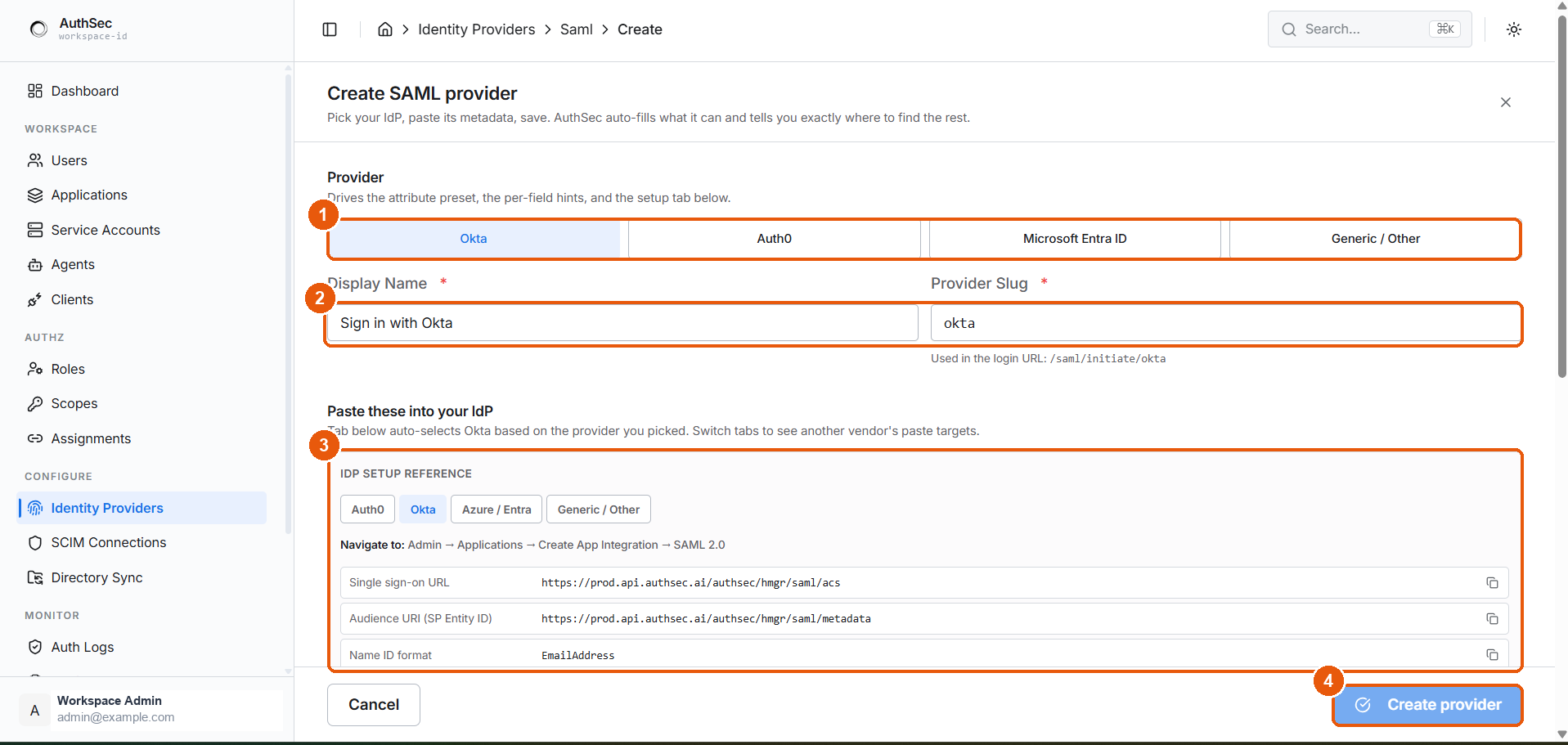
① Provider preset · ② Display Name and Provider Slug · ③ paste targets for your IdP · ④ Create provider
The exchange
Unlike OIDC, this is one screen, not a wizard — fill it in and click Create provider.
Pick a preset
The preset at the top drives three things: the attribute mapping defaults, the per-field hints, and which tab of the setup reference opens.
| Preset | For |
|---|---|
| Okta | Okta |
| Auth0 | Auth0 |
| Microsoft Entra ID | Entra ID / Azure AD enterprise applications |
| Generic / Other | Ping, ADFS, OneLogin, Shibboleth, anything else |
Choosing a preset changes hints and defaults only. It never locks you in — every field stays editable, and a wrong preset costs nothing but worse hints.
Naming the provider
| Field | What it does |
|---|---|
| Display Name | The label on the login button — "Sign in with Okta" |
| Provider Slug | Goes into the login URL: /saml/initiate/<slug> |
It becomes part of a URL you may hand to an IdP or embed in a bookmark. Keep it short and lowercase — okta, azure-ad, auth0.
The three paste targets
Every IdP needs these, though each vendor names them differently.
| AuthSec calls it | Okta | Auth0 | Entra |
|---|---|---|---|
| Single sign-on URL | Single sign-on URL | Application Callback URL | Reply URL (ACS URL) |
| Audience URI (SP Entity ID) | Audience URI | Audience | Identifier (Entity ID) |
| Name ID format | Name ID format | — | Unique User Identifier |
Each row has a copy button. The panel switches vendor tabs independently of the preset, so you can look up another vendor's wording without changing your configuration.
Import the IdP metadata
Rather than typing four fields, paste the IdP's metadata XML and click Apply metadata — AuthSec fills in the entity ID, SSO URL, SLO URL, and certificate for you.
Most IdPs publish this as a "Federation Metadata" or "SAML 2.0 Metadata" file or URL. Do it this way where you can; hand-copying a PEM certificate is where mistakes happen.
Identity provider fields
| Field | Required | Notes |
|---|---|---|
| IdP Entity ID (Issuer) | Yes | Uniquely identifies the IdP |
| IdP SSO URL | Yes | Where AuthSec sends users to log in |
| IdP SLO URL | No | Single logout — leave blank unless your tenant has it enabled |
| X.509 Signing Certificate | Yes | PEM, including the BEGIN/END markers |
| Name ID Format | — | Email Address is the recommended default |
Attribute mapping
The preset pre-fills these. Override only if your IdP emits different names.
| AuthSec field | Typical value |
|---|---|
email, or a schema URI | |
| First name | firstName / given_name |
| Last name | lastName / family_name |
Okta and Auth0 use short names. Entra and many generic IdPs emit long http://schemas.xmlsoap.org/ws/2005/05/identity/claims/... URIs. The preset picks the right shape — this is the main thing it saves you.
Set up your provider
If sign-in fails
| Symptom | Usual cause |
|---|---|
| Signature validation failed | Wrong or stale certificate — re-import the metadata |
| Audience / recipient mismatch | The Audience URI at the IdP differs from AuthSec's |
| User signs in but has no email | Attribute mapping does not match what the IdP emits |
| Blank page after the IdP | ACS URL at the IdP does not match the Single sign-on URL |
| Logout does nothing | SLO URL not set, or not enabled at the IdP |