Identity Providers
An identity provider (IdP) is the system that actually checks who someone is. AuthSec does not store passwords for your end users — it hands the login off to Google, Microsoft, Okta, or whoever you connect here, and trusts the answer that comes back.
Connecting one means your users sign in with credentials they already have, and your organisation keeps its existing controls: MFA, conditional access, and offboarding all stay with the IdP. Revoke someone there and they lose access here too.
In the console, go to CONFIGURE → Identity Providers.
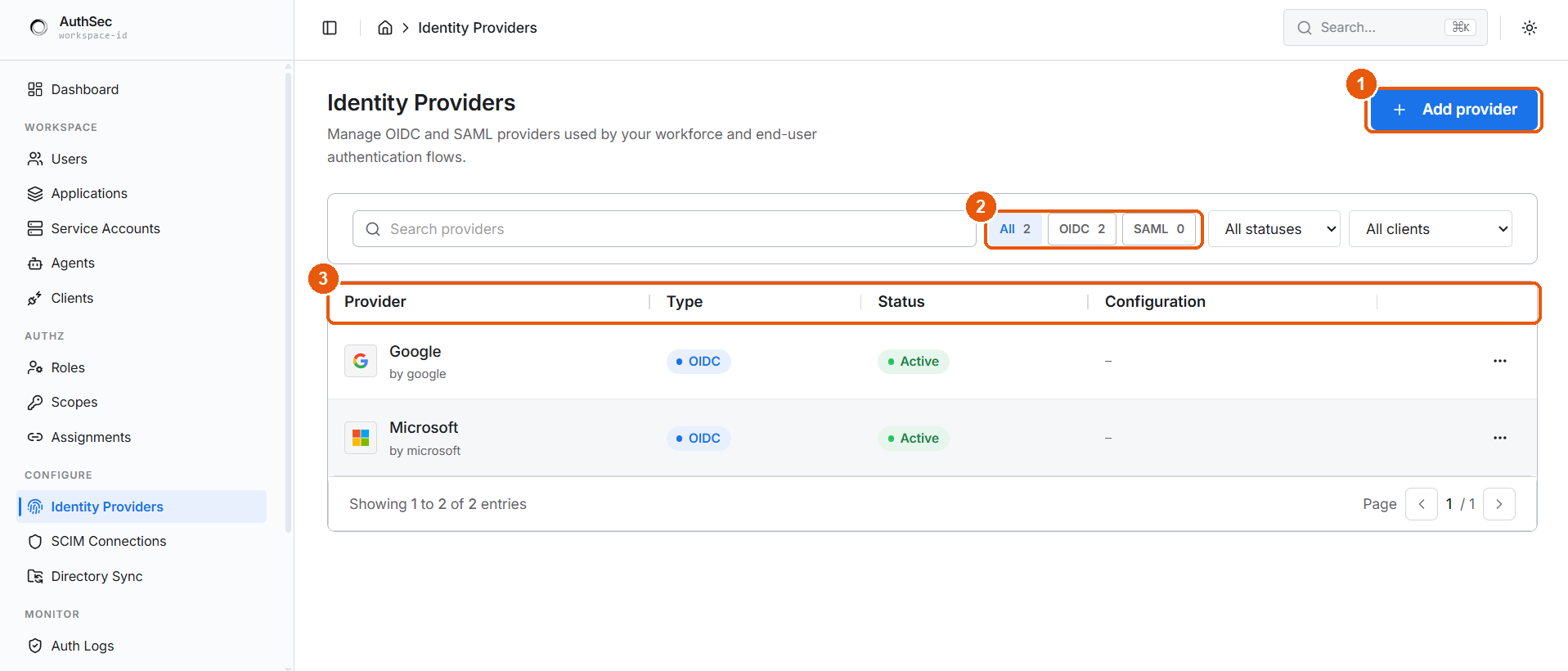
① Add provider · ② filter by type, status, or client · ③ the providers table
What happens at sign-in
Two things follow from this. The Callback URL must be registered at the IdP exactly, or step 4 never arrives. And AuthSec decides permissions — the IdP only answers who, while scopes and roles are resolved here after the assertion lands.
Choosing OIDC or SAML
Both give you SSO. Pick by what the provider supports — if it offers both, take OIDC.
| OIDC / OAuth 2.0 | SAML 2.0 | |
|---|---|---|
| Typical providers | Google, Microsoft, GitHub | Okta, Entra ID, Ping, ADFS |
| Setup effort | Client ID + secret | Certificate exchange, both directions |
| You give the IdP | Callback URL | Entity ID + ACS URL |
| IdP gives you | Client ID, client secret | Entity ID, SSO URL, X.509 certificate |
| Scoped to a client | No — workspace-wide | Yes — bound to one client |
| Best when | Modern apps, quick setup | Enterprise IT mandates SAML |
It needs two values from the provider console and no certificate handling. Reach for SAML when an enterprise customer or IT policy requires it, or when the provider offers nothing else.
The providers table
| Column | Shows |
|---|---|
| Provider | Display name, with the underlying template beneath it |
| Type | OIDC or SAML badge |
| Status | Active or Inactive |
| Configuration | Client binding, where one applies — – for workspace-wide OIDC |
Active means the provider appears as a button on the login screen. Inactive keeps the configuration but hides it, which is the safe way to take a provider offline without losing its credentials.
You can run several at once — each active provider becomes another button, so a workspace might offer Google for staff and Okta for one enterprise customer. Filter the list with the search box, the type tabs (All, OIDC, SAML, each with a live count), or the All statuses and All clients dropdowns. Row actions live under the ⋯ menu.
Before you start
You need admin access in both places — the AuthSec console, and the provider console where you will register the application. Setup is a round trip: AuthSec gives you a URL to paste into the IdP, and the IdP gives you credentials to paste back.
Secrets you enter are stored in Vault and never written to the database.
Set up a provider
- OIDC / OAuth 2.0 — Google, Microsoft, GitHub
- SAML 2.0 — Okta, Entra ID
- Manage providers — activate, deactivate, delete
What is not on this page
| Need | Where |
|---|---|
| Machine, service, or agent credentials | Autonomous agent authentication |
| Automatic user provisioning | CONFIGURE → SCIM Connections |
| Importing users from a directory | CONFIGURE → Directory Sync |
| Who can do what once signed in | Roles and scopes |
Connecting an identity provider controls authentication — proving who someone is. It does not grant permissions; that is authorisation, and it is resolved separately once the user is through the door.