Kubernetes workloads (SPIFFE)
~20 minutes (plus SPIRE, if your cluster does not run it yet). The strongest machine credential is no credential: the SPIRE agent attests your pod and issues a short-lived (~5 min) JWT-SVID; AuthSec verifies it against your registered trust domain. Nothing stored, nothing to leak, nothing to rotate.
For the complete runnable program and API details, see Kubernetes / SPIFFE (Python SDK).
Why SPIFFE — the zero-credential model
Traditional M2M auth stores a secret (Method A) or a private key (Method B) alongside the workload. SPIFFE eliminates stored credentials entirely:
| Client secret | Private-key JWT | SPIFFE | |
|---|---|---|---|
| What proves identity | Shared string | Signed assertion | Platform attestation |
| What can leak | The secret itself | The key file | Nothing |
| Rotation | Manual deployment | Manual key swap | Automatic (~5 min SVIDs) |
| Identity granularity | Per-secret | Per-key | Per-pod (namespace + service account + image) |
| Audit trail | "Someone with this secret" | "Someone with this key" | "This exact pod in this namespace" |
The core idea: instead of giving the workload a credential, you let the platform vouch for it. The SPIRE agent on each node checks what the pod actually is (its Kubernetes namespace, service account, labels) and issues a short-lived JWT-SVID — a cryptographic proof of identity that AuthSec can verify without any shared secret.
Key terms
| Term | What it means |
|---|---|
| SPIFFE ID | A URI identifying the workload: spiffe://trust-domain/path |
| SVID | A short-lived JWT proving the workload holds that SPIFFE ID (~5 min) |
| Trust domain | Your org's identity boundary — registered once in AuthSec |
| SPIRE | The runtime that attests workloads and issues SVIDs (one agent per node) |
| Attestation | SPIRE verifying a pod's runtime attributes before issuing an SVID |
Deeper background: Workload identity and SPIFFE.
How it works
How a pod gets a token:
- The pod asks the local SPIRE agent (unix socket) for a JWT-SVID.
- The SDK presents the SVID as its client assertion at the token endpoint.
- AuthSec verifies it against your trust domain's OIDC discovery endpoint -- the workload identity provider you register below.
- Out comes a scoped access token, same as every other method.
Setup has three parts: cluster (once), trust registration (once), and workload connection (per application).
Prerequisites -- SPIRE in your cluster
You need a running SPIRE deployment with the OIDC discovery endpoint exposed at a public URL. The official quickstart covers the base install.
Registration entry -- map your pod to a SPIFFE ID:
spire-server entry create \
  -spiffeID spiffe://your-trust-domain/your-workload \
  -parentID spiffe://your-trust-domain/spire-agent \
  -selector k8s:ns:default -selector k8s:sa:your-service-account
Agent socket volume mount -- expose the SPIRE agent socket to the pod:
volumes:
  - name: spire-agent-socket
    hostPath: { path: /run/spire/sockets, type: Directory }
containers:
  - name: your-app
    volumeMounts:
      - name: spire-agent-socket
        mountPath: /run/spire/sockets
        readOnly: true
Step 1 -- Register the trust domain (once)
Sidebar -> SETTINGS -> Trusted Issuers -> Workload identity providers -- issuers your workloads authenticate with: SPIRE trust domains and OIDC federation (e.g. GitHub Actions). No secrets. Click + Add provider:

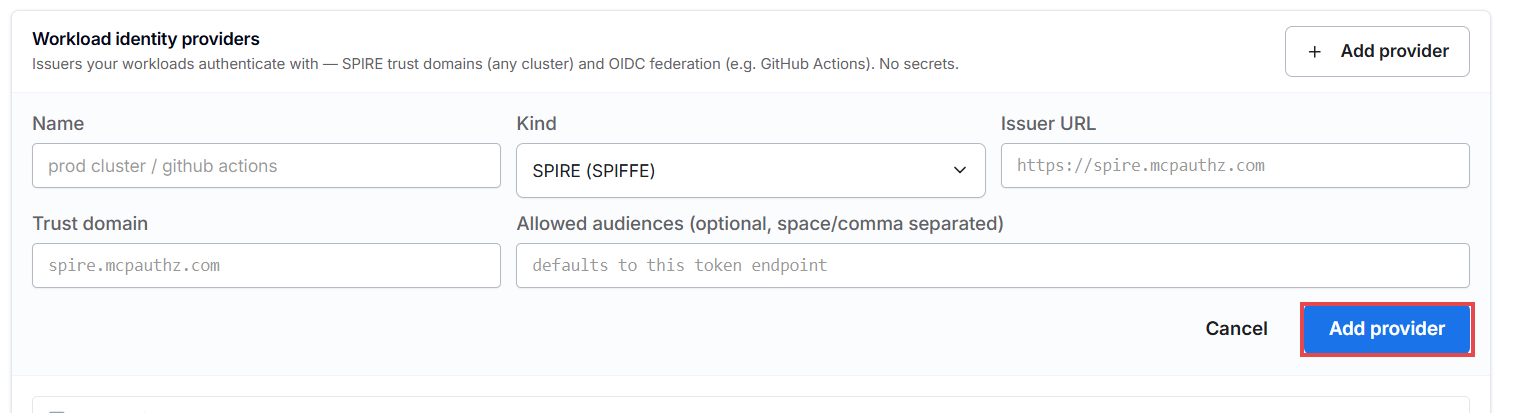
- Name -- a label, e.g.
prod-spire - Kind --
SPIRE (SPIFFE) - Issuer URL -- your SPIRE OIDC discovery URL
- Trust domain -- your SPIFFE trust domain, e.g.
authsec.local - Allowed audiences -- leave empty; defaults to this token endpoint, which is exactly what SVIDs must be minted for
Step 2 -- Connect the workload to your application
Open the application -> Access tab -> Add access -> Kubernetes workload, no secret:
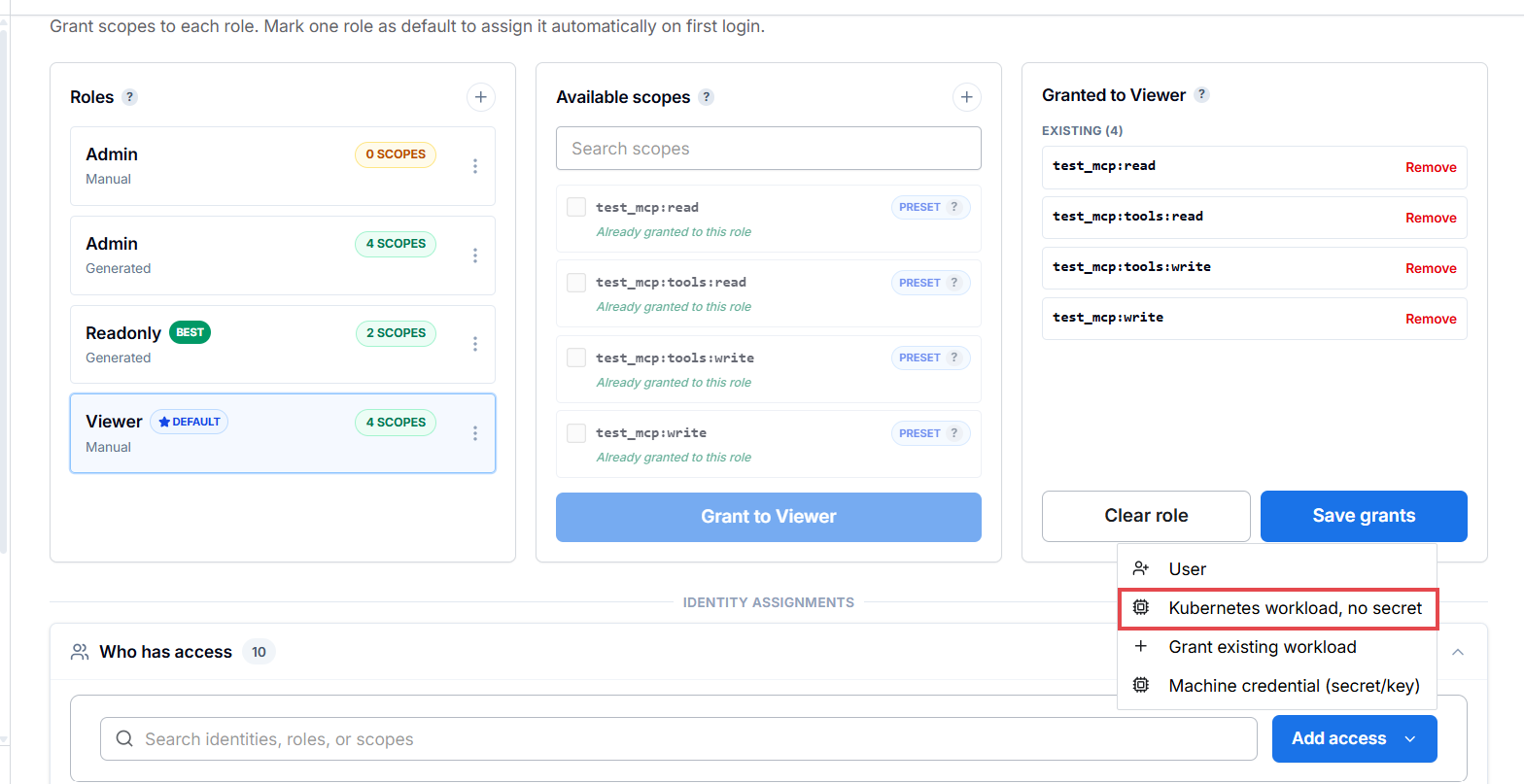
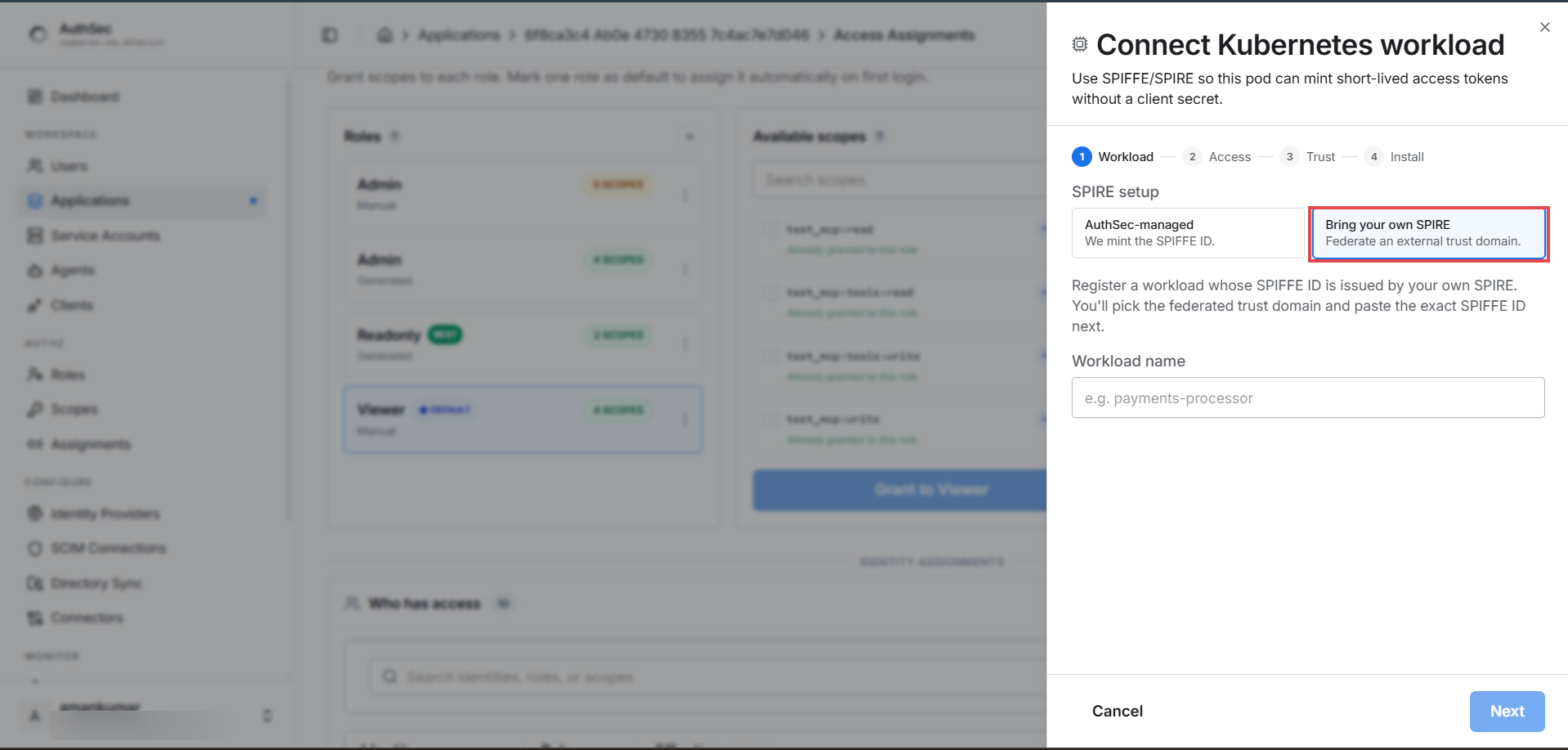
A four-step wizard opens:
Workload -- choose AuthSec-managed (AuthSec mints the SPIFFE ID for you) or Bring your own SPIRE (federates the trust domain from step 1), and name the workload:
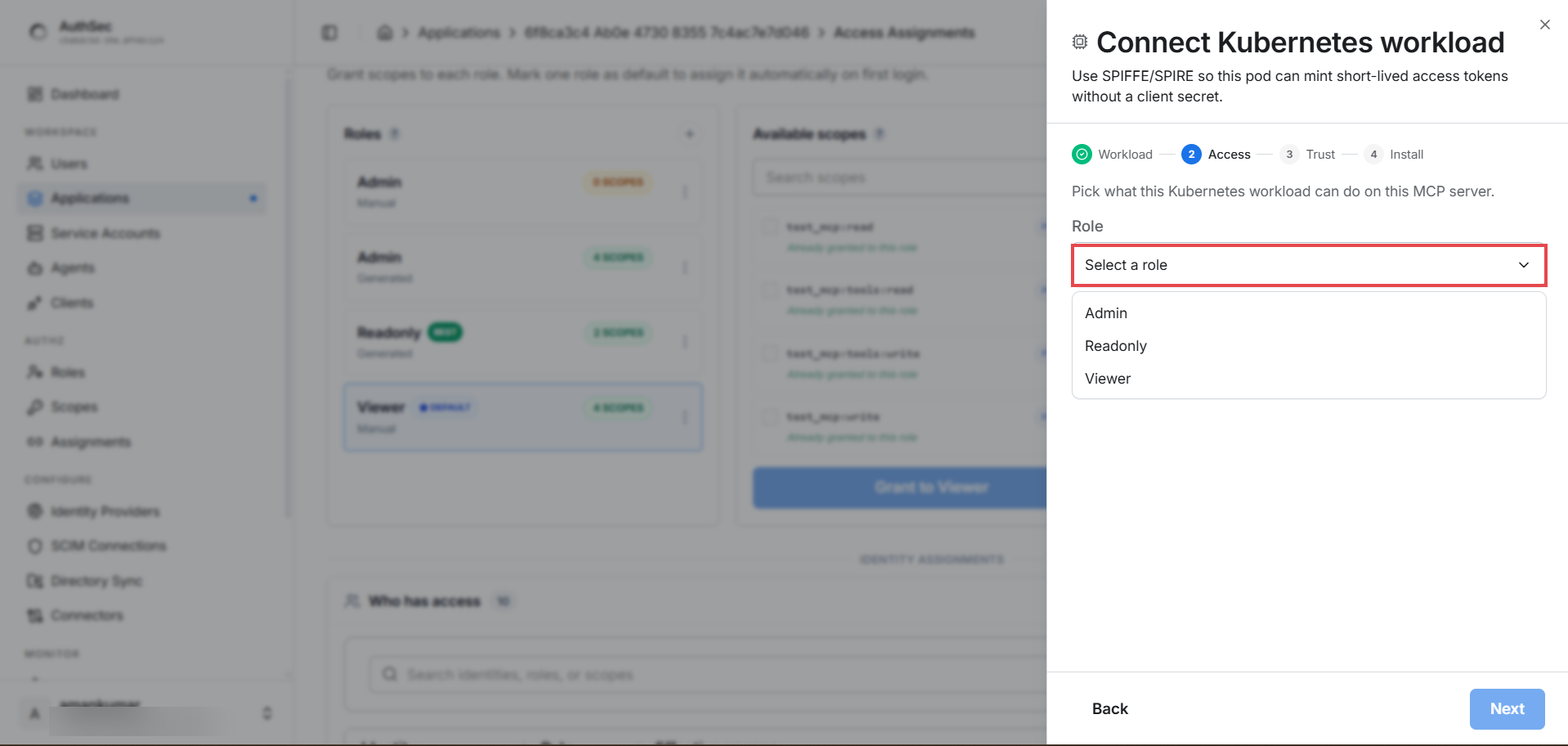
Access -- pick the role this workload holds on the application (the roles from Roles and access):
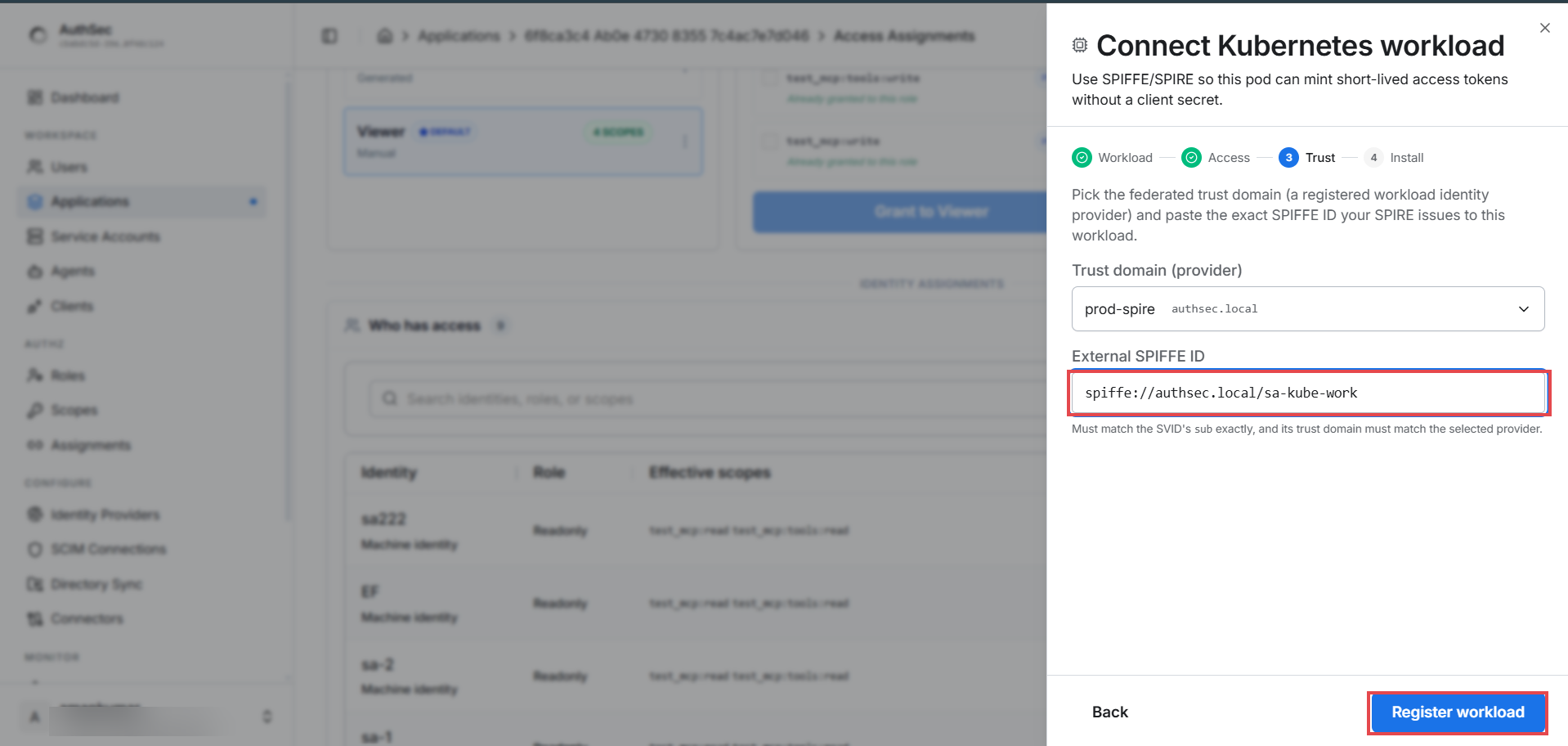
Trust -- select your registered provider and paste the exact SPIFFE
ID from your SPIRE registration entry
(spiffe://your-trust-domain/ns/prod/sa/api). Must match the SVID's
sub exactly, and its trust domain must match the selected provider.
Click Register workload:
Install -- the confirmation screen is your pod's contract:
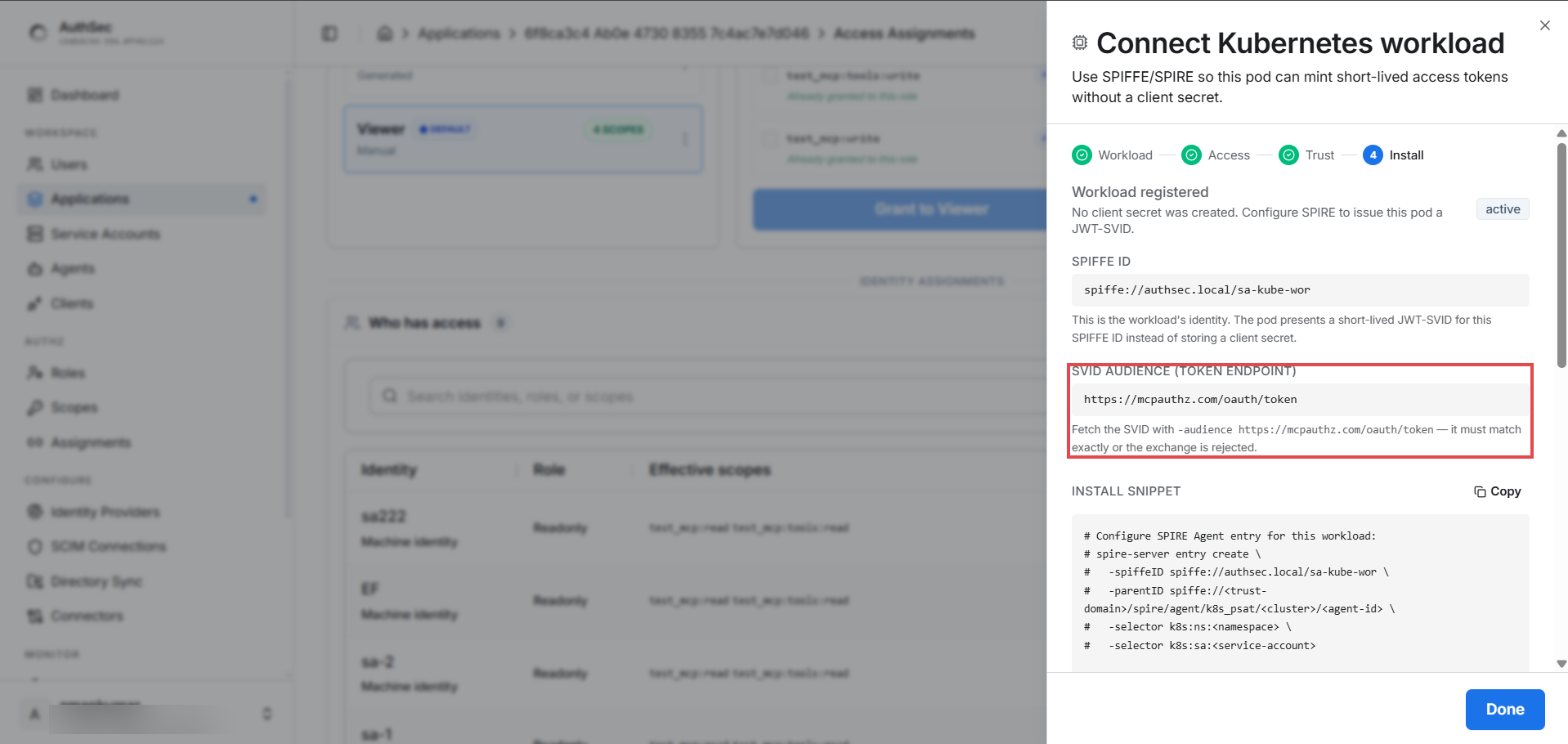
- SPIFFE ID -- the identity the pod presents instead of any secret
- SVID audience -- must be minted for the token endpoint
(
https://app.authsec.ai/oauth/token) exactly, or the exchange is rejected - Install snippet -- a ready-made
spire-server entry createcommand (fill in your namespace / service-account selectors)
Click Done -- the workload appears in Who has access as an active machine identity with its role and effective scopes.
Step 3 -- Code inside the pod
The SDK fetches and renews SVIDs automatically from the agent socket:
from authsec_sdk import SpiffeWorkloadIdentity, SpiffeConfig

spiffe = SpiffeWorkloadIdentity(SpiffeConfig(
    mcp_server_url=MCP_URL,
    client_id=SPIFFE_CLIENT_ID,                    # from the Install screen
    spiffe_id="spiffe://your-domain/your-workload",
    scopes=["my_mcp:read"],
))
async with spiffe:
    token = await spiffe.access_for()
Full program and details: Python SDK -- Kubernetes / SPIFFE.
Verify
- Application -> Connections tab shows the workload as an active
(m2m)connection with its role and scopes. - MONITOR -> M2M Logs shows each token grant as it happens.
- A
tools/listcall with the token returns only the tools the granted scopes allow.
Revoking
Application -> Access tab -> Who has access -> the workload's ... menu -> Revoke access. This removes access to this application only; other grants are untouched.
Troubleshooting
| Error | Cause | Fix |
|---|---|---|
invalid_client: token aud must include this token endpoint | SVID minted with the wrong audience | Mint with -audience https://app.authsec.ai/oauth/token |
invalid_client: ... token is expired | JWT-SVIDs live ~5 minutes | Mint right before use, or use SpiffeWorkloadIdentity (auto-renews) |
| Exchange rejected despite correct audience | SPIFFE ID does not match the SVID's sub, or trust domain mismatch | Re-check step 2's Trust screen against your SPIRE registration entry |
Next
Dive deeper into workload identity and its role in AI: