Map tools to scopes
Decide which scope gates each tool. Everything else in the lifecycle is mechanical; this is the part you think about once and refine over time. By the end of this step, every tool is either gated by a specific scope, marked public, or explicitly denied — the fail-closed default means nothing slips through.
- Scopes defined (at least one access label exists)
- Tools visible on the Tools tab
This page assumes you know what a tool manifest is (the inventory you're acting on) and what a scope is (the permission you're mapping to).
Tools start denied
On the Tools tab, freshly discovered tools show denied runtime
access and "No label assigned":
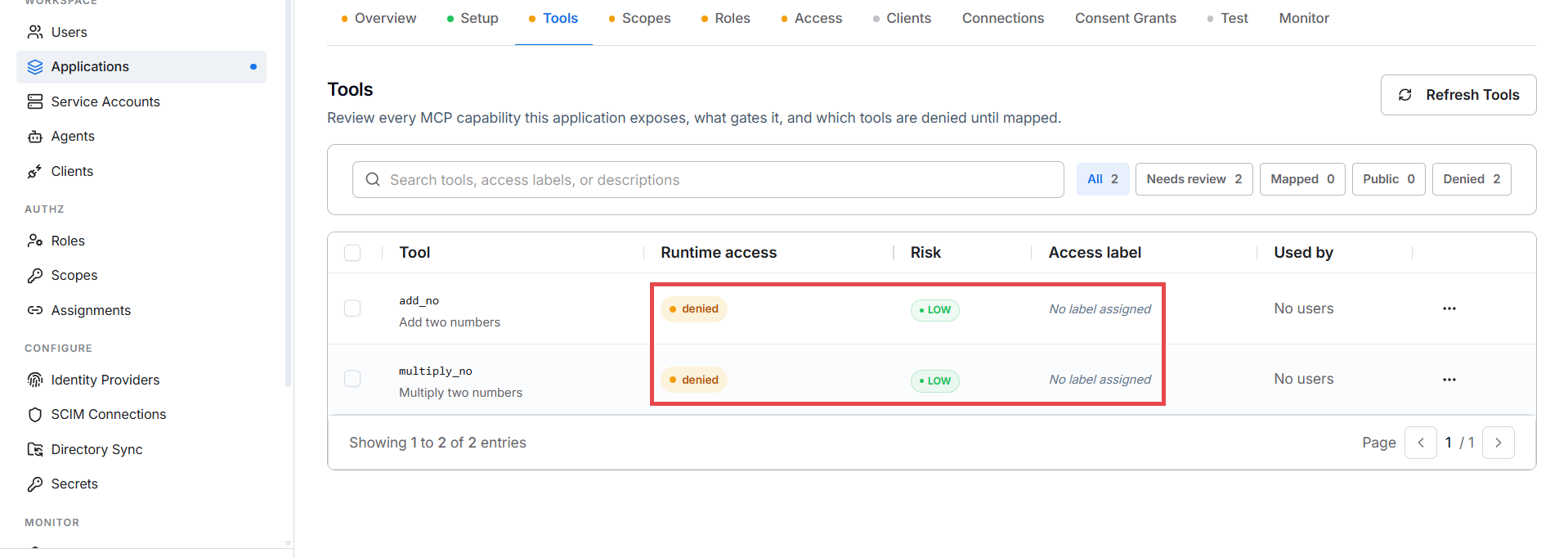
This is intentional — fail closed. A tool nobody thought about is a tool nobody can call.
Map a tool
Click a tool to open its detail panel. It states the problem plainly — "Denied until mapped: the SDK will fail closed for this tool until an operator maps it to an access label" — shows the three-step access path (tool discovered → label mapping → user role grants label), and lists the available labels with a Map button each:
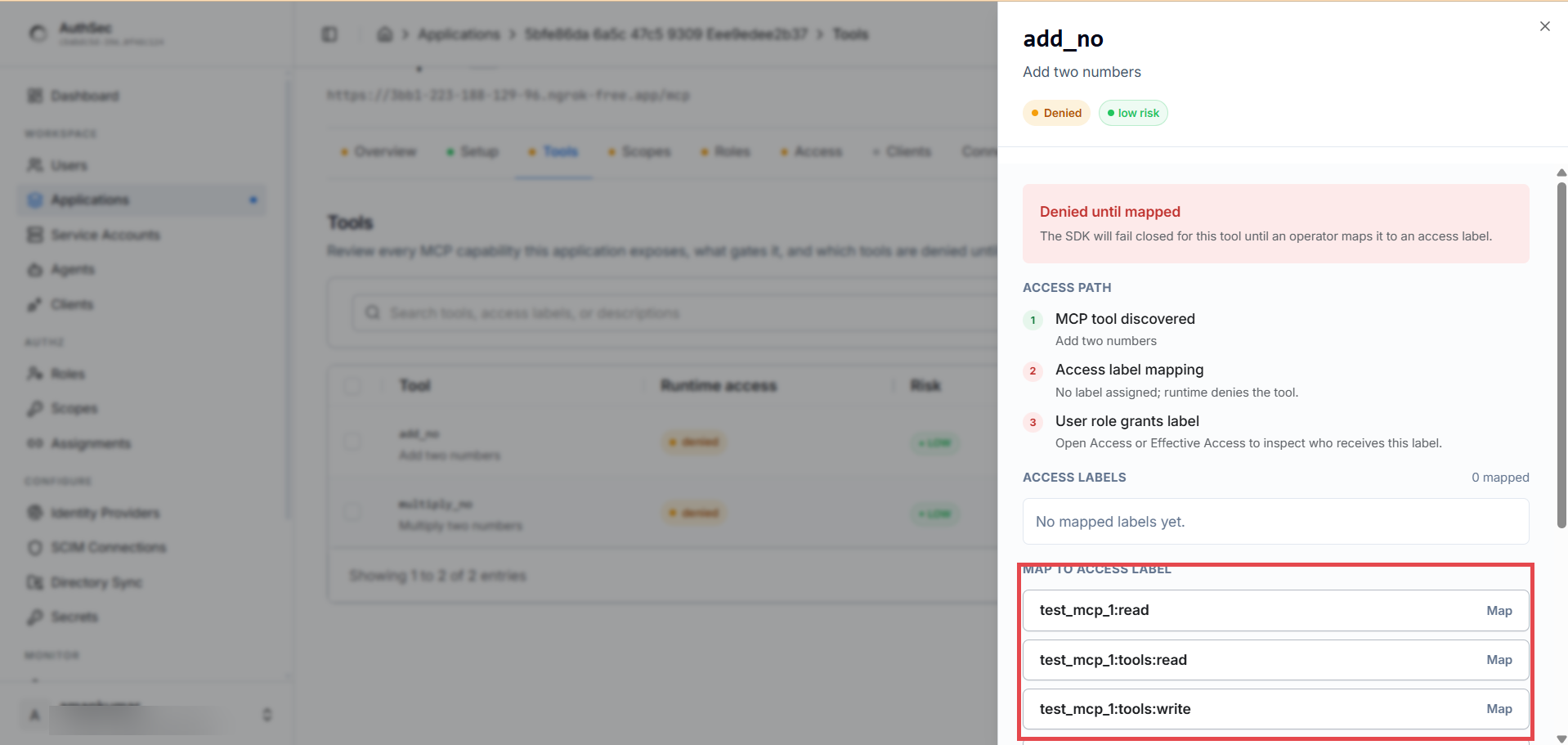
Pick the label that matches what the tool does:
| Tool | Sensible label |
|---|---|
list_prompts, get_prompt | my_mcp:tools:read |
create_prompt, delete_prompt | my_mcp:tools:write |
health_check | Public (see below) |
The header counters (All / Needs review / Mapped / Public / Denied) update as you go.
The four states
| State | What it means at runtime |
|---|---|
| Mapped | Tool requires the configured scope. SDK returns 403 insufficient_scope if the token lacks it. |
| Public | No auth required for this tool. Use sparingly. |
| Unmapped / Denied | Tool exists but nobody can call it. The safe default. |
| Admin override | Manually-set mapping that differs from the SDK's suggestion. Survives manifest republishes. |
Public tools — when it's OK
Rare, but legitimate:
- Health checks —
ping/healthreturning server status, no business data - Capability discovery — feature lists with no protected data
- Public-by-design datasets — e.g. open weather data
Never public: anything that modifies state, returns user-specific data, or wraps an authenticated upstream API.
Bulk mapping via API
No bulk-edit UI yet — script it with the admin JWT:
TOKEN="..."   # admin JWT
RS="<your-resource-server-id>"

curl -X PUT "https://app.authsec.ai/authsec/resource-servers/$RS/tool-scope-map" \
  -H "Authorization: Bearer $TOKEN" \
  -H "Content-Type: application/json" \
  -d '{
    "mappings": [
      {"tool_name": "actions_get_workflow",  "scope_id": "my_mcp:tools:read"},
      {"tool_name": "actions_get_run",       "scope_id": "my_mcp:tools:read"},
      {"tool_name": "health_check",          "public": true}
    ]
  }'
What re-scan does to mappings
Same tool name across scans → mapping preserved (admin overrides always survive). Renamed tool → shows up as new and unmapped; the old mapping is marked stale. Removed tool → mapping row kept as audit trail.
How the SDK consumes this
At runtime the SDK fetches the compiled policy
(GET /authsec/resource-servers/:id/sdk-policy) into its scope matrix —
cached ~30 s in the Python SDK — and enforces it per tools/call. Dashboard
changes reach a running server within that window, no redeploy.
Verify
The filter chips read Denied 0 — every tool is either Mapped (gated by a scope) or Public. The Needs review count should be zero.
Troubleshooting
| Symptom | Cause | Fix |
|---|---|---|
Tool stays denied after mapping | The page didn't save — check that the tool's Access label column shows the scope | Re-open the tool detail panel and click Map again |
| Launch still blocked after mapping all tools | A tool was added after the last scan and is unmapped | Click Refresh Tools to re-import, then map the new tools |