First Login Experience
After completing your security setup, you're ready to log in to AuthSec!
Login Process
You will be redirected to the sign-in page where you can authenticate using the methods you've configured.
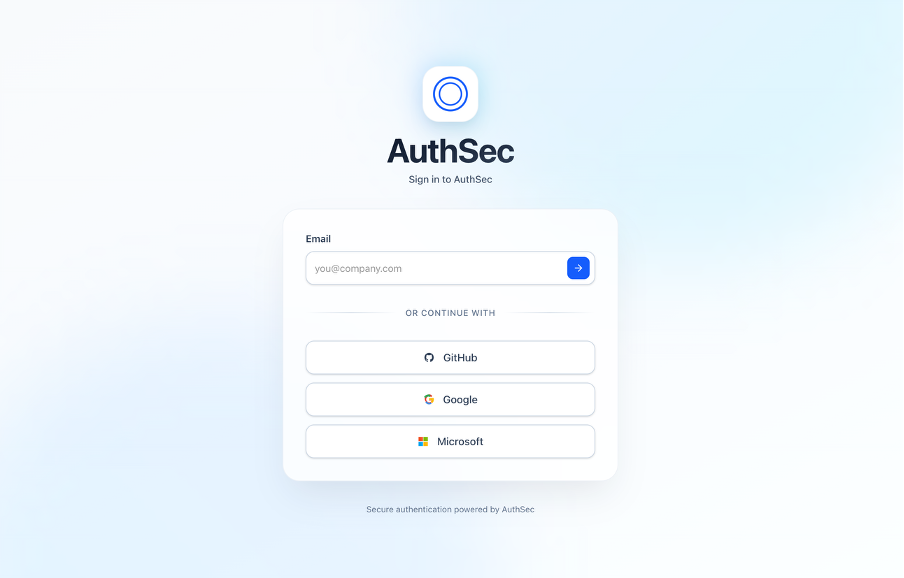
Login Options:
Depending on what you set up, you can login using:
- Password + Email
- WebAuthn (Biometric)
- Fingerprint
- Face recognition
- Hardware security key
- Authenticator Code (TOTP) - if enabled
- OAuth Provider - Google, GitHub, or Microsoft
Authentication Flow
With Password + MFA:
- Enter your email address
- Enter your password
- Complete MFA verification:
- Biometric authentication (WebAuthn), or
- 6-digit authenticator code (TOTP)
- Access granted!
With WebAuthn Only:
- Enter your email address
- Verify using your biometric (fingerprint/face) or security key
- Access granted!
With OAuth Provider:
- Click on Google, GitHub, or Microsoft
- Complete authentication with the provider
- Complete MFA verification if enabled
- Access granted!
What Happens Next?
After successful authentication:
- You're logged into your AuthSec workspace
- Dashboard loads with your organization's overview
- You can start configuring authentication for your applications
This completes the onboarding flow! You're now ready to explore the AuthSec platform.
Success!
You've successfully secured your AuthSec account. Welcome to the platform!
Troubleshooting
Can't access your account?
- Forgot password? Use the "Forgot Password" link on the login page
- Lost MFA device? Contact your workspace administrator for recovery
- Need help? Reach out to support@authsec.ai
MFA not working?
- Ensure your device time is synchronized (for TOTP)
- Try using a backup authentication method
- Check if your security key is properly connected (for WebAuthn)