Service accounts: private-key JWT
~15 minutes. No shared secret crosses the wire: your service signs a short-lived JWT assertion with its private key; AuthSec verifies it with the public key you publish. The enterprise-posture upgrade from client secret.
For the complete runnable program and API details, see Private-key JWT (Python SDK).
How it works
Step 1 -- Generate a keypair
openssl genrsa -out private_key.pem 2048
openssl rsa -in private_key.pem -pubout -out public_key.pem
private_key.pem stays on the machine that runs your service. Never
commit it, never upload it -- including to AuthSec. The private key is
the credential.
Step 2 -- Host the public key as a JWKS
AuthSec fetches your public key from a URL you control, in JWKS format.
Generate it from public_key.pem:
from cryptography.hazmat.primitives import serialization
import base64, json

pub = serialization.load_pem_public_key(open("public_key.pem", "rb").read())
n, e = pub.public_numbers().n, pub.public_numbers().e
b64u = lambda i, l: base64.urlsafe_b64encode(i.to_bytes(l, "big")).rstrip(b"=").decode()
print(json.dumps({"keys": [{
    "kty": "RSA", "use": "sig", "alg": "RS256", "kid": "key-1",
    "n": b64u(n, (n.bit_length() + 7) // 8), "e": b64u(e, 3),
}]}, indent=2))
Host the JSON anywhere public -- your own domain
(https://example.com/.well-known/jwks.json), an S3 bucket, or a GitHub
gist for testing. Each key entry carries a kid (key id) that your
service references when signing.
With a gist, use the raw URL
(gist.githubusercontent.com/.../raw/.../jwks.json) -- the normal gist
page URL serves HTML and verification fails with
parse JWKS: invalid character '<'.
Step 3 -- Create the service account with the JWKS URI
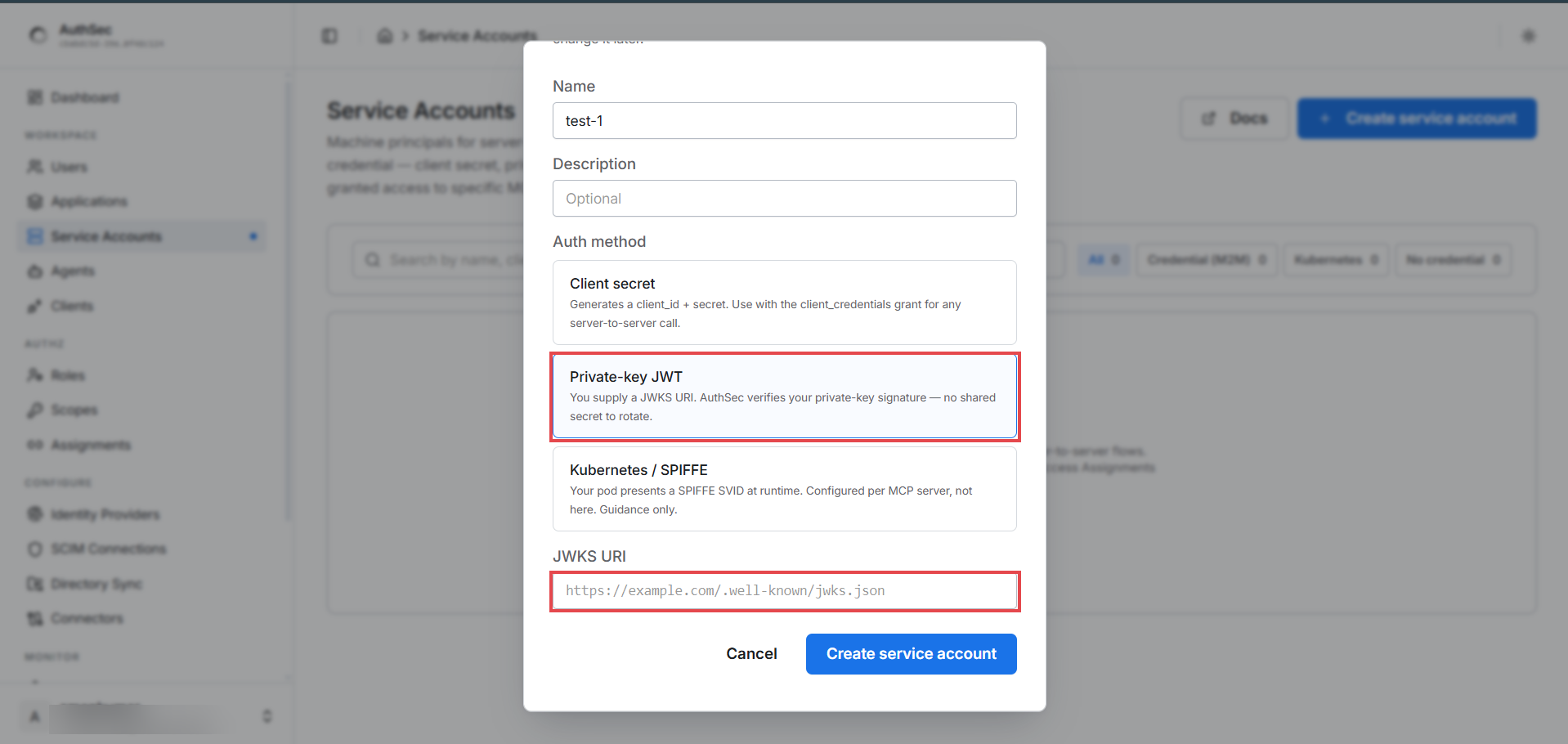
WORKSPACE -> Service Accounts -> + Create service account. Pick Private-key JWT as the auth method -- a JWKS URI field appears. Paste your URL:
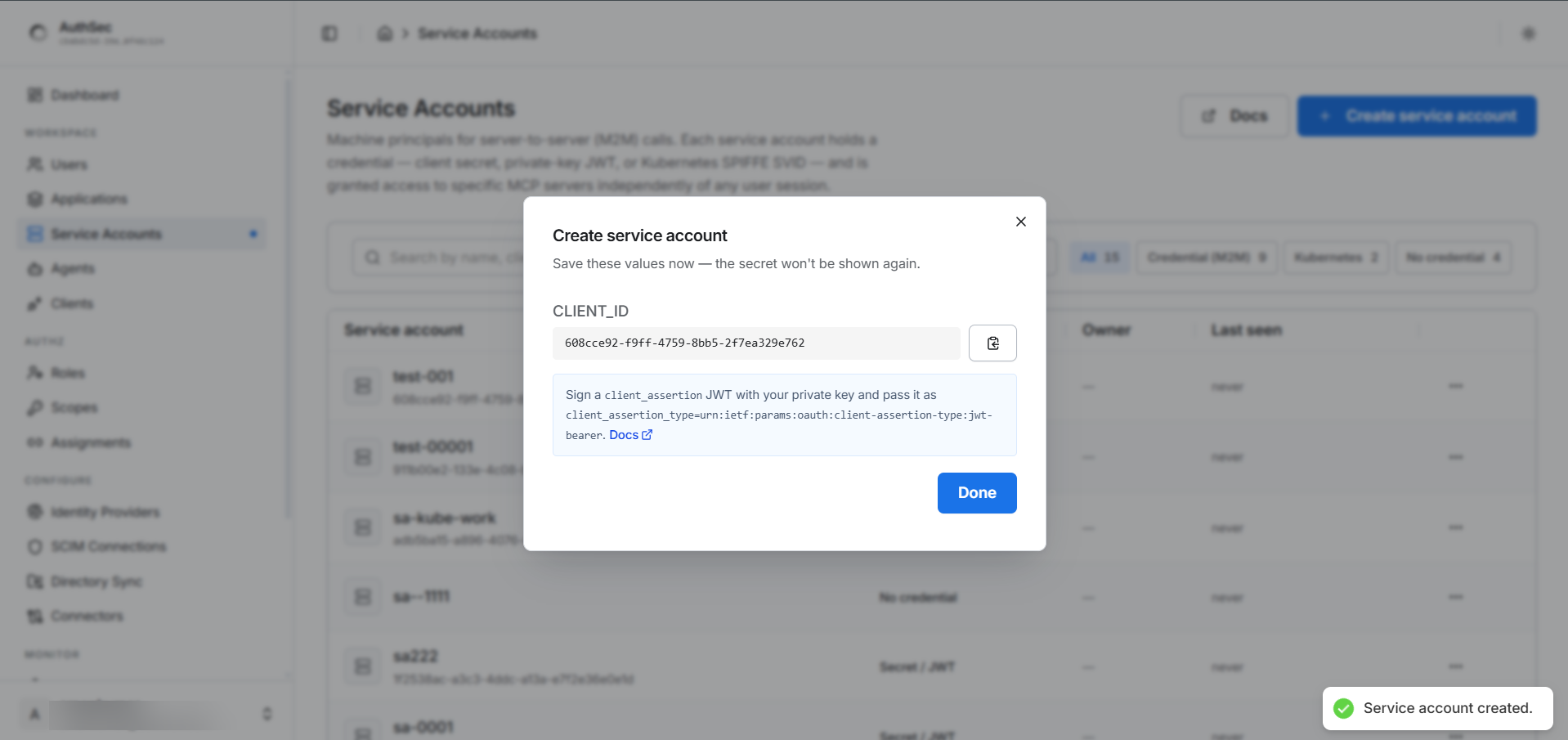
No secret to save -- the dialog hands you only a CLIENT_ID. Nothing
confidential between you and AuthSec; your private key never leaves your
machine:
Step 4 -- Grant access
Same as every machine identity: application -> Access tab ->
Add access -> Machine credential (secret/key) -> pick the account
and a role. Without a grant, token requests fail with access_denied.
Step 5 -- Sign and call
from authsec_sdk import AgentIdentity, PrivateKeyJwtAuth

agent = AgentIdentity(
    ISSUER, PK_CLIENT_ID,
    auth=PrivateKeyJwtAuth("private_key.pem", kid="key-1"),  # kid must match your JWKS
)
async with agent:
    token = await agent.access_for(MCP_URL, requested_scopes=["my_mcp:read"])
Each request signs a fresh assertion -- 5-minute lifetime, single-use
jti, audience-bound to the token endpoint -- so an intercepted assertion
is useless. Full program and details:
Python SDK -- private-key JWT.
Verify
- Application -> Connections tab shows the account as an active
(m2m)connection with its role and scopes. - MONITOR -> M2M Logs shows each token grant as it happens.
- A
tools/listcall with the token returns only the tools the granted scopes allow.
Key rotation (no downtime)
- Generate a new pair; add the new public key to the JWKS under
kid: "key-2"(keepkey-1in place). - Deploy the service with the new private key and
kid="key-2". - Remove the old JWKS entry.
No dashboard changes needed -- AuthSec always verifies against your live JWKS.
Revoking
Application -> Access tab -> Who has access -> the account's ... menu -> Revoke access. This removes access to this application only; other grants are untouched.
Troubleshooting
| Error | Cause | Fix |
|---|---|---|
JWKS resolution failed: parse JWKS: invalid character '<' | JWKS URI returns HTML (gist page URL, 404 page) | Point at raw JSON -- see the warning in step 2 |
| Signature verification fails | kid mismatch between code and JWKS, or wrong key deployed | Make PrivateKeyJwtAuth(kid=...) match the JWKS entry |
access_denied: client not authorized for this resource server | No grant on the target application | Step 4 |
Next
Running in Kubernetes? Drop the stored key entirely:
-> Kubernetes / SPIFFE -- the platform attests the pod; nothing to leak, nothing to rotate.