Method A — Client secret
When to use it
The client-secret method is the simplest way for a machine to authenticate: the service account holds a client id and a shared secret, and sends them as HTTP Basic auth on every token request. It's the right starting point for a quick proof of concept or a simple deployment where you can store a secret safely.
The trade-off is inherent to shared secrets: the secret crosses the wire on every request. Anyone who obtains it can impersonate the service account until you rotate it. Treat it like a password — store it in a secret manager, never in source control — and when your security posture demands that the secret never travels, move to private-key JWT or SPIFFE. See the comparison if you're unsure.
How it works
On the wire this is OAuth's client_credentials grant with
client_secret_basic client authentication:
POST <token_endpoint>
Authorization: Basic base64(client_id ":" client_secret)   ← ClientSecretAuth adds this
Content-Type: application/x-www-form-urlencoded

grant_type=client_credentials&resource=<MCP_URL>&scope=<requested>
        │
        ▼
{ "access_token": "eyJ…", "expires_in": 3600, "token_type": "Bearer" }
The SDK discovers <token_endpoint> from the MCP server URL (PRM → AS
metadata, see how a token is acquired),
builds the Authorization: Basic header from your credentials, and caches the
returned token. You supply only the id, the secret, and the MCP URL.
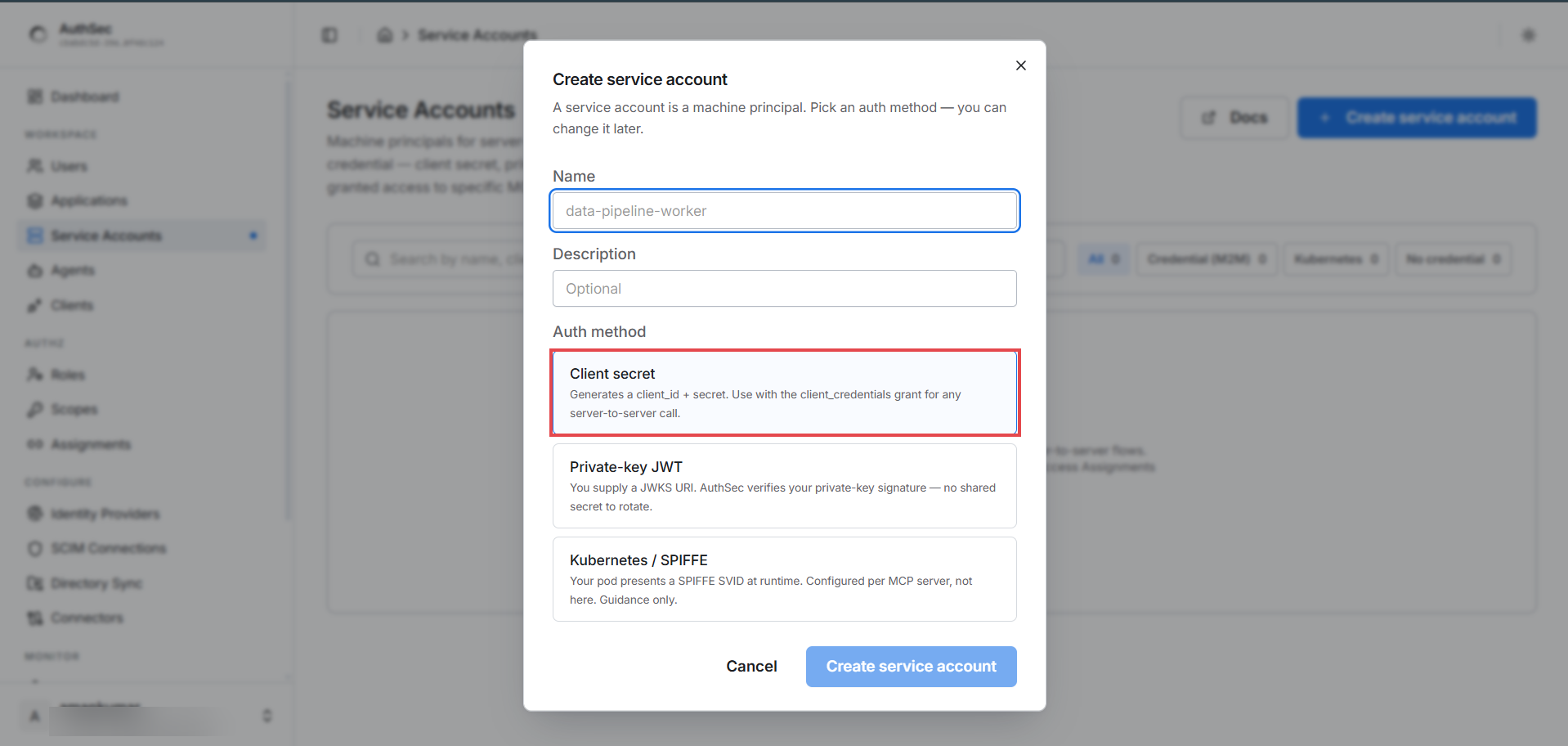
Step 1 — Create the service account
In the create dialog, name it, keep Client secret selected (the default), and click Create service account:
Step 2 — Save the credentials (shown once)
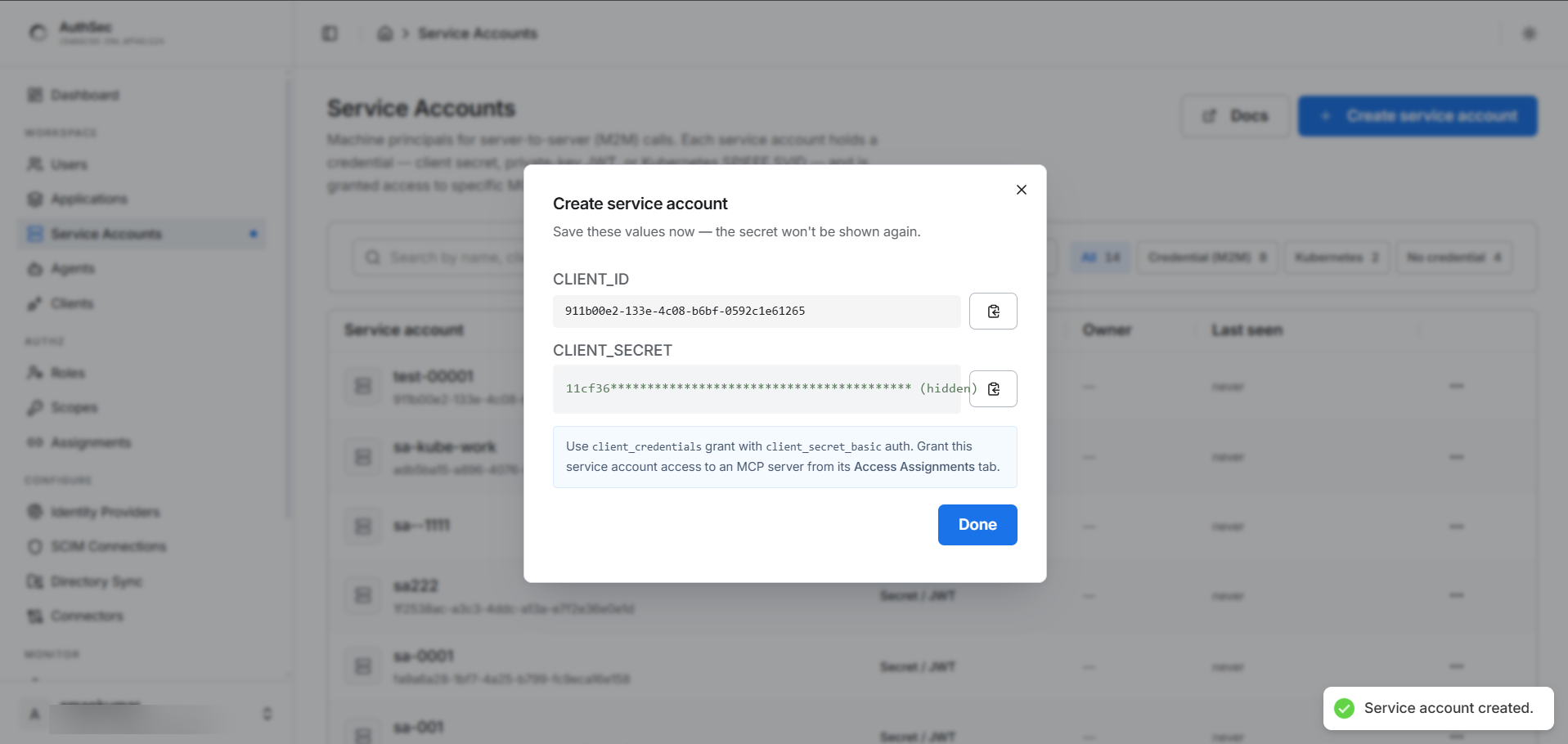
Copy both values into your service's environment — the secret is shown once.
The dialog also confirms the wire mechanics (client_credentials grant,
client_secret_basic auth), which is exactly what the SDK performs for you:
AUTHSEC_ISSUER=https://mcpauthz.com
SA_CLIENT_ID=8a7c1107-...
SA_CLIENT_SECRET=<the secret you copied>     # 64 hex chars — copy, don't retype
MCP_URL=https://your-mcp-server.example.com/mcp
Step 3 — Acquire a token
First grant the service account a role
on the target application (a valid credential with no grant returns
access_denied). Then:
package main

import (
	"context"
	"log"
	"os"

	authsec "github.com/authsec-ai/sdk-authsec/packages/go-sdk"
)

func main() {
	agent := authsec.NewAgentIdentity(authsec.AgentIdentityConfig{
		Issuer:   os.Getenv("AUTHSEC_ISSUER"),
		ClientID: os.Getenv("SA_CLIENT_ID"),
		Auth:     authsec.NewClientSecretAuth(os.Getenv("SA_CLIENT_SECRET")),
	})

	token, err := agent.AccessFor(context.Background(), os.Getenv("MCP_URL"),
		authsec.WithRequestedScopes("test_mcp:read", "test_mcp:tools:read"))
	if err != nil {
		log.Fatalf("access_for: %v", err)
	}
	log.Printf("acquired token (%d chars) — send as Authorization: Bearer", len(token))
}
What this does, and what the SDK handles for you:
NewClientSecretAuth(secret)builds theclient_secret_basiccredential. It panics on an empty secret — an empty secret is always a configuration bug, so it fails immediately rather than producing confusing401s later. TheAgentIdentityConfig{ClientSecret: "..."}shorthand is identical on the wire; use whichever reads better (but never set both — that also panics).AccessFor(ctx, MCP_URL, WithRequestedScopes(...))runs the full flow: discovers the token endpoint fromMCP_URL, adds the Basic header, requestsclient_credentialswithresource=MCP_URL, and caches the token for reuse. Build theagentonce and reuse it — it holds the cache.- You never construct the Basic header, call the token endpoint, or parse
expires_in— that's all insideAccessFor.
Send the returned string as Authorization: Bearer <token> on your MCP calls,
then confirm it works with the verify snippet.
Rotating the secret
Because the secret travels on every request, rotate it periodically and
immediately if it may have leaked: generate a new secret in the dashboard
(Service Account → rotate), deploy it to SA_CLIENT_SECRET, and the old one
stops working. There's no keypair or JWKS to manage — the simplicity that makes
this method easy is also why rotation is the only lever you have.
Shared steps for every method: grant access · verify · troubleshooting