Machine-to-machine auth
The problem this solves
Some callers of your MCP server are not people. A data pipeline, a cron job, a backend service, a Kubernetes workload — each needs to call protected tools as itself, with its own standing permissions and no human in the loop. There is no browser to open, no consent screen to click, no user whose identity the call should borrow.
OAuth has a grant type for exactly this: client_credentials. The machine
authenticates as a client and receives an access token scoped to what that
client is allowed to do. AuthSec models each such machine as a Service
Account — a principal that holds one credential and is granted access to
specific MCP servers, independent of any user session.
(If instead the caller acts on behalf of a signed-in user — a copilot running errands for Alice — that's delegation, not M2M. See ID-JAG delegation.)
How a token is acquired
Every M2M method ends at the same place — the authorization server's token
endpoint, exchanging a proof of identity for a scoped access token. Here is
what AgentIdentity.AccessFor actually does on a cache miss
(agent_identity.go):
agent.AccessFor(ctx, MCP_URL, WithRequestedScopes("test_mcp:read"))
        │
        ▼
1. Cache check — return the cached token if it has >30s left.
        │ (miss)
        ▼
2. Discover the token endpoint FROM the MCP server URL:
     GET  MCP_URL/.well-known/oauth-protected-resource   (RFC 9728 PRM)
            → authorization_servers[0]
     GET  <AS>/.well-known/oauth-authorization-server     (RFC 8414)
            → token_endpoint
        │
        ▼
3. POST <token_endpoint>
     grant_type = client_credentials
     resource   = MCP_URL          ← binds the token's audience to this server
     scope      = "test_mcp:read"  ← what you asked for
     + proof of identity (how the three methods differ — see below)
        │
        ▼
4. Cache the access_token until (expires_in − a safety buffer), return it.
The important consequence: you never configure a token endpoint or an
authorization-server URL for M2M. You give AccessFor the MCP server's
URL, and the SDK discovers everything else from that server's published
metadata. The resource parameter (RFC 8707)
is what makes the resulting token valid only against that server.
The three methods
All three produce a client_credentials token. They differ only in how the
machine proves its identity at step 3:
| Method | Proof | Secret on the wire? | Best for |
|---|---|---|---|
| A. Client secret | client id + shared secret (HTTP Basic) | ⚠️ every request | quick starts, simple deployments |
| B. Private-key JWT | RS256-signed assertion (RFC 7523) | ✅ never — the key stays local | enterprise security postures |
| C. SPIFFE SVID | platform-attested workload identity | ✅ no stored credential at all | Kubernetes |
The ladder A → B → C runs from "shared password" to "asymmetric keys" to "the infrastructure itself vouches for the workload." Pick the strongest one your environment supports.
One API, three credentials
In code the three methods are interchangeable: the same AgentIdentity, the
same AccessFor, only the Auth value changes. This is deliberate — it lets
you start on a client secret and graduate to SPIFFE without touching your
call sites.
import authsec "github.com/authsec-ai/sdk-authsec/packages/go-sdk"

// A — shared secret
agent := authsec.NewAgentIdentity(authsec.AgentIdentityConfig{
    Issuer: ISSUER, ClientID: CLIENT_ID, Auth: authsec.NewClientSecretAuth("sec_..."),
})

// B — RFC 7523 private-key JWT (returns an error — check it)
pk, err := authsec.NewPrivateKeyJwtAuth("private_key.pem", "key-1")
agent = authsec.NewAgentIdentity(authsec.AgentIdentityConfig{Issuer: ISSUER, ClientID: CLIENT_ID, Auth: pk})

// C — a pre-held SPIFFE JWT-SVID
agent = authsec.NewAgentIdentity(authsec.AgentIdentityConfig{
    Issuer: ISSUER, ClientID: CLIENT_ID, Auth: authsec.NewSpiffeSvidAuth(svid),
})

token, err := agent.AccessFor(ctx, MCP_URL, authsec.WithRequestedScopes("test_mcp:read"))
What each part does:
AgentIdentityConfig.Issuer— the AuthSec authorization-server URL. It's used for enterprise-IdP / XAA paths; for pure M2M the token endpoint is discovered from the MCP URL, butIssueris still required by the constructor.AgentIdentityConfig.ClientID— the service account's client id (a UUID from the dashboard). It identifies which client is authenticating.AgentIdentityConfig.Auth— the credential, aClientAuth(below). This is the only field that changes between methods.NewAgentIdentitypanics ifIssuerorClientIDis empty, or if you set bothAuthand theClientSecretshorthand — an empty or double credential is always a configuration bug, so it fails at construction rather than on the first request.AccessFor(ctx, resource, opts...)returns the token string. Pass the scopes you need withWithRequestedScopes(...); the token comes back carrying at most those scopes (intersected with what the service account is actually granted).
The ClientAuth interface
You rarely implement this, but understanding it explains why the methods slot
in interchangeably. A ClientAuth contributes either an HTTP header or POST
body parameters to each token request (credentials.go):
type ClientAuth interface {
    Headers(clientID string) map[string]string             // e.g. Authorization: Basic …
    BodyParams(clientID, tokenEndpoint string) map[string]string  // e.g. client_assertion …
}
ClientSecretAuthreturns anAuthorization: Basicheader and no body params —client_secret_basic.PrivateKeyJwtAuthreturns no header and a freshly signedclient_assertionbody param — the private key signs, the secret never travels.SpiffeSvidAuthreturns the SPIFFE JWT-SVID as aclient_assertion.
The token endpoint is passed to BodyParams because assertions must be
audience-bound to it — an assertion minted for one endpoint can't be
replayed against another.
Token caching — build one, reuse it
AgentIdentitycaches tokens per resource, in memory, guarded by a mutex. Build one instance per process and reuse it — a new instance starts with an empty cache and re-does discovery on every call.AccessForserves the cached token until it's within 30 seconds of expiry, then transparently acquires a fresh one. If the MCP server returns401(e.g. the token was revoked mid-life), callagent.ClearCache(MCP_URL)and retry once.
Pick your method
| Method | Guide |
|---|---|
| A. Client secret — simplest, shared secret | Client secret |
| B. Private-key JWT — RFC 7523, key never leaves your machine | Private-key JWT |
| C. SPIFFE SVID — Kubernetes, zero stored credentials | Kubernetes / SPIFFE |
Service accounts — the dashboard side
Machines are registered as Service Accounts (sidebar → Service Accounts). Each is a machine principal holding one credential — client secret, private-key JWT, or Kubernetes SPIFFE — and is granted access to MCP servers independently of any user. Click + Create service account:
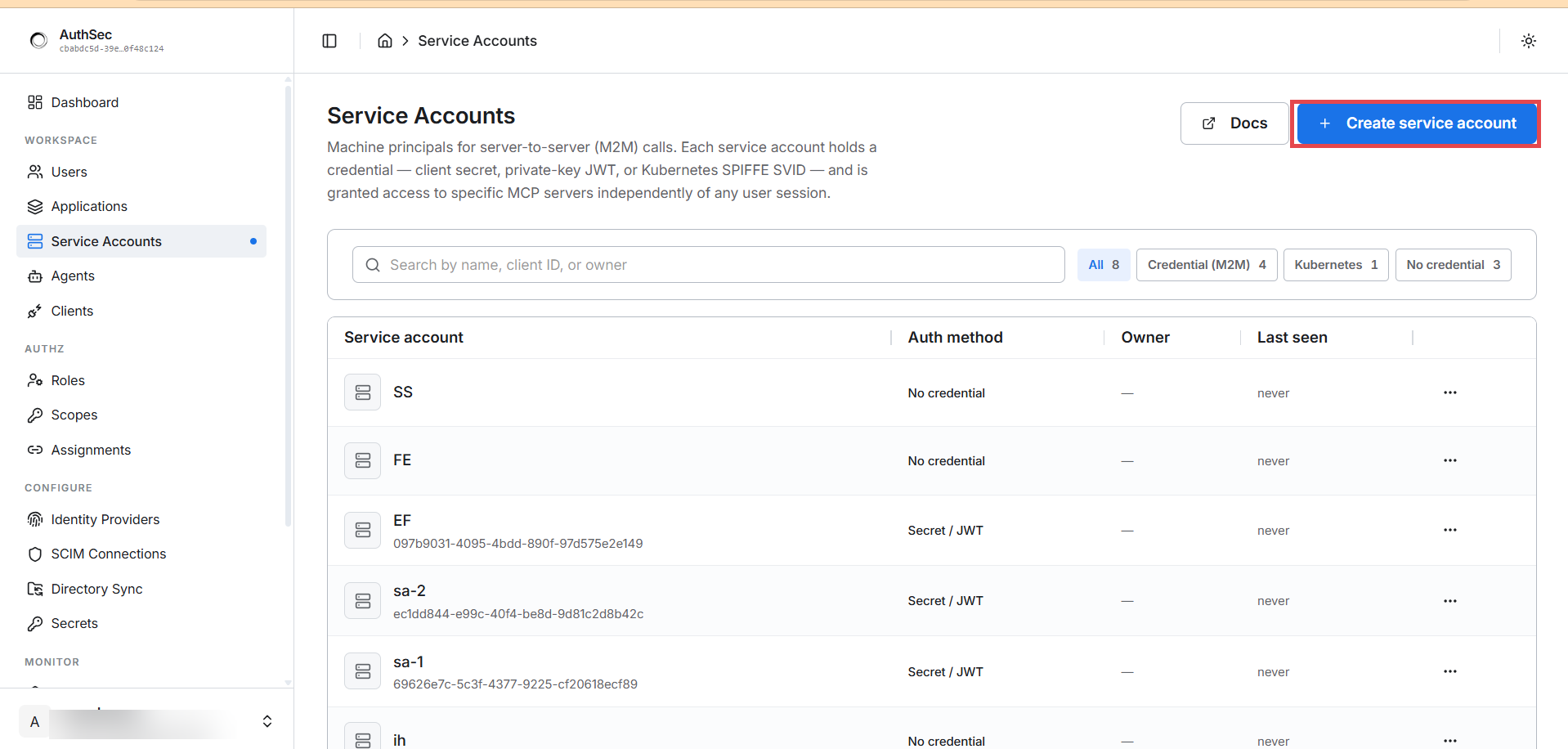
The filters show the credential split (Credential (M2M) / Kubernetes / No credential), and the Auth method column shows what each account holds.
Methods A and B are created here (pick the auth method, then grant access). Method C (SPIFFE) is configured per MCP server: you register a trust domain once under Trusted Issuers, then connect the workload from the app's Access tab. Full walkthrough in Method C.
Grant access — required for every method
Creating a service account gives it an identity, not permissions. Until you grant it a role on the target application, every token request fails with:
access_denied: client not authorized for this resource server
This is the single most common first-run error, and it's by design — a fresh
machine principal can authenticate but can reach nothing. Assign it a role
(e.g. Readonly with the read scopes) on the target application — see
Roles and access for role and scope grants. Once
granted, the connection appears on the application's Connections tab as an
active (m2m) connection, showing the role and scopes it was granted through.
Verify it works
Run the code from any method, then prove the token actually opens the door:
// toolsList sends an authenticated MCP tools/list to prove the token works.
func toolsList(ctx context.Context, mcpURL, token string) (*http.Response, error) {
	body := strings.NewReader(`{"jsonrpc":"2.0","method":"tools/list","id":1}`)
	req, _ := http.NewRequestWithContext(ctx, http.MethodPost, mcpURL, body)
	req.Header.Set("Authorization", "Bearer "+token)
	req.Header.Set("Content-Type", "application/json")
	req.Header.Set("Accept", "application/json, text/event-stream")
	return http.DefaultClient.Do(req)
}
- A
200whosetoolsarray contains only the tools your granted scopes allow confirms the whole chain: the token was minted, its audience matched the server, and the SDK'stools/listfilter ran. - A
401means the token was rejected (wrong audience, expired, revoked) — see Protect your MCP server → token validation. - The application's M2M Logs (sidebar → Monitor) shows every token grant as it happens.
Error handling
Agent-side failures are typed pointer errors that embed AuthSecIdentityError
(with a stable Code and HTTPStatus). Match them with errors.As and react
per case:
token, err := agent.AccessFor(ctx, mcpURL, authsec.WithRequestedScopes("test_mcp:read"))
if err != nil {
var credErr *authsec.CredentialInvalidError
var notReg *authsec.ResourceNotRegisteredError
switch {
case errors.As(err, &credErr):
log.Fatalf("bad credential: %s", credErr.Detail) // re-copy client_id/secret
case errors.As(err, ¬Reg):
log.Fatalf("unknown MCP server: %s", notReg.Resource) // register it in AuthSec first
default:
log.Fatalf("access_for: %v", err)
}
}
| Type | Code | Meaning |
|---|---|---|
*CredentialInvalidError | credential_invalid | client id/secret wrong, or assertion rejected (has Detail) |
*ResourceNotRegisteredError | resource_not_registered | the MCP URL isn't a registered application (has Resource) |
*PendingApprovalError | access_pending | delegation path only — see ID-JAG |
*AuthSecIdentityError | (various) | base type for anything else (access_denied, server_error, …) |
Troubleshooting
Common errors and their fixes:
| Error | Cause | Fix |
|---|---|---|
invalid_client: invalid client secret | Typo'd or rotated secret (they're 64 hex chars) | Copy-paste from the dashboard; never retype |
access_denied: client not authorized for this resource server | Credential is valid but no access assignment exists | Grant a role for the target application (above) |
JWKS resolution failed: parse JWKS: invalid character '<' | Your JWKS URI returns HTML (a gist page, a 404 page) | Point it at raw JSON; for gists use the raw URL |
invalid_client: token aud must include this token endpoint | SPIFFE SVID minted with the wrong audience | Mint with audience = <issuer>/oauth/token |
invalid_client: … token is expired | JWT-SVIDs live ~5 min | Mint right before use, or use SpiffeWorkloadIdentity |
| signature verification fails (private-key JWT) | kid mismatch between code and JWKS, or wrong key | Make NewPrivateKeyJwtAuth(..., kid) match the JWKS kid |
panic: Auth and ClientSecret are mutually exclusive | Two credentials configured at once | Set exactly one of Auth or ClientSecret |
Works, then suddenly 401s | Token revoked or expired mid-life | agent.ClearCache(mcpURL) and retry once |
Related
- Protect your MCP server — the server these tokens call
- Client secret · Private-key JWT · Kubernetes / SPIFFE
- ID-JAG delegation — call on behalf of a user instead of as yourself