ID-JAG delegation: act on behalf of a user
An M2M service (the M2M guide) acts as itself. But a copilot or chatbot acts for a person: when Alice asks her assistant to check her tickets, the MCP server should apply Alice's permissions, and the audit log should read "Alice, via agent X." This guide gives you exactly that — an agent that calls MCP tools with the user's authority, scoped to what the user approved, fully auditable and revocable.
Time: ~20 minutes for the first run (register → wire → consent → approve). Every run after is seamless.
Why the obvious approaches fail
| Approach | Why it's wrong |
|---|---|
| Give the agent a powerful service account | Every user gets the same over-broad access; the audit log says "the bot did it," not who asked |
| Hand the user's own token to the agent | The agent can now do everything the user can, everywhere, indefinitely, invisibly |
| Screen-scrape / share the password | No isolation, no scoping, no revocation, no audit |
What you actually want is a token that encodes two identities at once — the user whose authority is being used, and the agent using it — scoped to just what the user approved, for just one server. That is what ID-JAG produces.
What ID-JAG is
ID-JAG — Identity Assertion JWT Authorization Grant — is the emerging cross-app-access standard (the flow is often called XAA, cross-app access). The user logs in once; the agent exchanges proof of that login for a scoped, short-lived access token that carries both identities:
{
  "sub": "alice@example.com",        // whose authority the call uses
  "act": { "client_id": "agent-x" }, // who is acting (the agent)
  "scope": "test_mcp:read",          // only what was requested AND approved
  "aud": "https://your-mcp/mcp"      // only this server
}
sub + act is what makes the delegation auditable — the MCP server and the
logs see both "Alice" and "agent-x." The scope and aud are what make it
bounded — the token can't do more than Alice approved, anywhere else.
The double opt-in
Delegation is gated by two independent, one-time approvals — neither side can grant access alone:
- User consent (once): at login the user sees exactly which scopes the agent is requesting and clicks Allow. The user agrees the agent may act for them.
- Admin approval (once): the first time the agent reaches a given MCP server, the server's admin admits the connection and picks the role it gets. The admin agrees this agent may connect at all.
Either side can revoke at any time, and revoking the agent's access never touches the user's own.
The flow, and what the SDK does internally
Two SDK calls drive everything: BrowserLogin (once, to get proof of the user's
login) and AccessFor (to turn that proof into a scoped token). Here's what
happens underneath (agent_identity.go,
browser_login.go):
BrowserLogin(ctx, issuer, agentClientID, {Resource})
   OIDC discovery → PKCE → open browser → user logs in + consents
   → authorization code → token exchange → returns id_token
        │
        ▼
AccessFor(ctx, MCP_URL, WithUserSession(idToken), WithRequestedScopes(...))
        │
   1. Discover PRM(MCP_URL) → AS metadata → token_endpoint
   2. Does this AS support XAA? (grant_types include token-exchange AND
      jwt-bearer AND the id-jag token type) AND is IDPIssuer set AND is a
      user session present?   ── no ──▶ fall back to the M2M "direct" path
        │ yes
   3. requester-bootstrap: ask AuthSec which flow this (agent, resource)
      pair should use, and whether access is already pending/denied
        │
        ├─ pending  ──▶ return *PendingApprovalError{RequestID, StatusURL}
        ├─ denied   ──▶ return *ApprovalDeniedError
        │ id_jag / cross_workspace
        ▼
   4. token-exchange:  id_token ──▶ ID-JAG
      grant_type=urn:ietf:params:oauth:grant-type:token-exchange
      subject_token=<id_token>, subject_token_type=…:id_token
      requested_token_type=…:id-jag, resource=MCP_URL
        │
        ▼
   5. jwt-bearer:  ID-JAG ──▶ scoped access token
      grant_type=urn:ietf:params:oauth:grant-type:jwt-bearer
      assertion=<ID-JAG>, resource=MCP_URL, scope=<requested>
        │
        ▼
   access token (sub=user, act.client_id=agent) — cached until near expiry
Steps 1–2 also run for plain M2M; steps 3–5 are the delegation-specific part. The two-hop exchange (token-exchange → jwt-bearer) is the ID-JAG protocol: the first hop proves the user logged in and mints the ID-JAG assertion; the second hop redeems that assertion for an access token the MCP server accepts.
Flow selection is automatic. You don't choose direct vs XAA —
AccessFordecides from what the AS advertises and whatrequester-bootstrapreturns. To force it, setAgentIdentityConfig.PreferredMode:"auto"(default),"direct-only"(skip delegation entirely), or"xaa-allowed"(fail rather than silently fall back to direct if bootstrap is unavailable).
Step 1 — Register the agent
Open Agents in the sidebar → + Register agent. An agent is "a confidential client that signs a user in, then reaches MCP servers via cross-app delegation (ID-JAG)." It appears in this list once it connects to its first server.
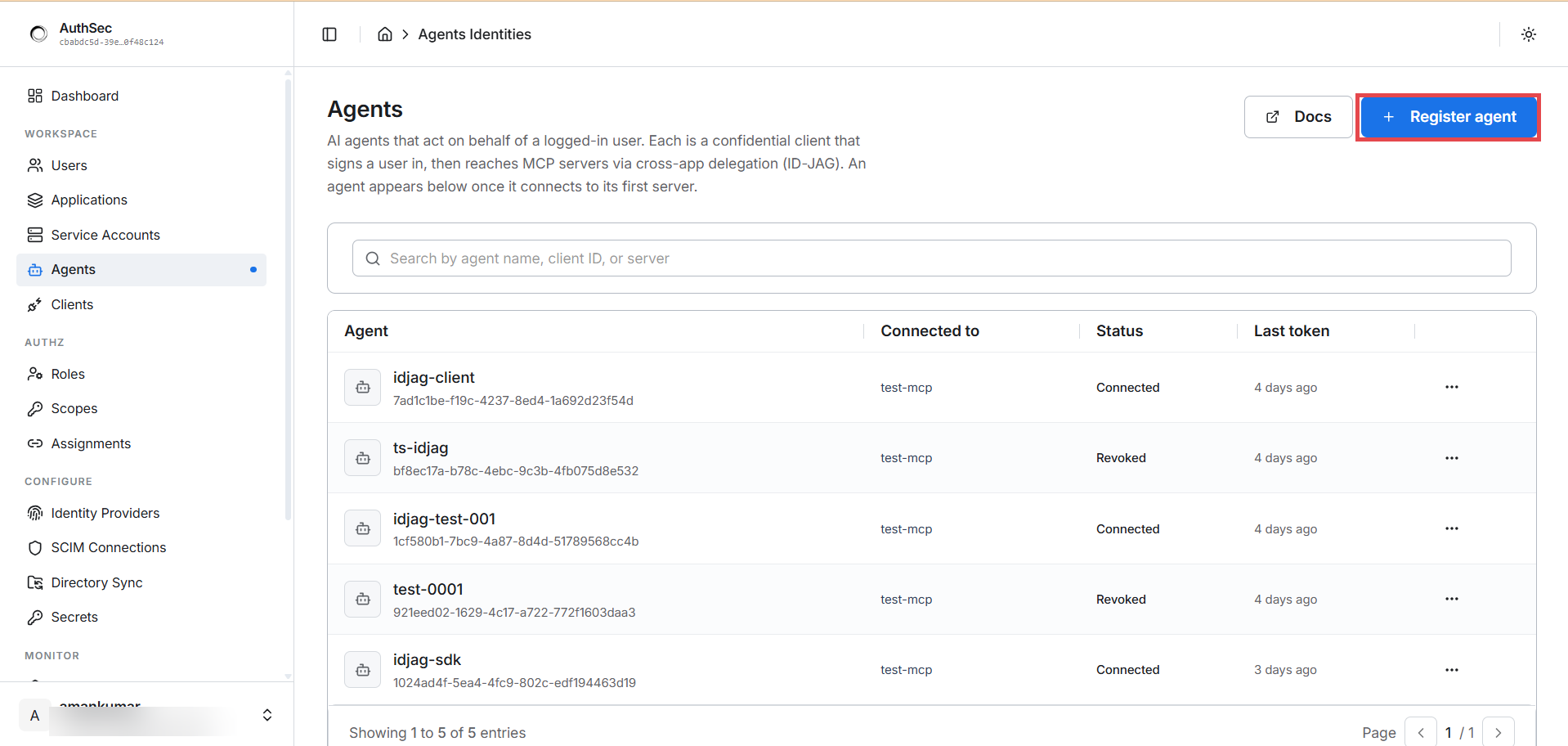
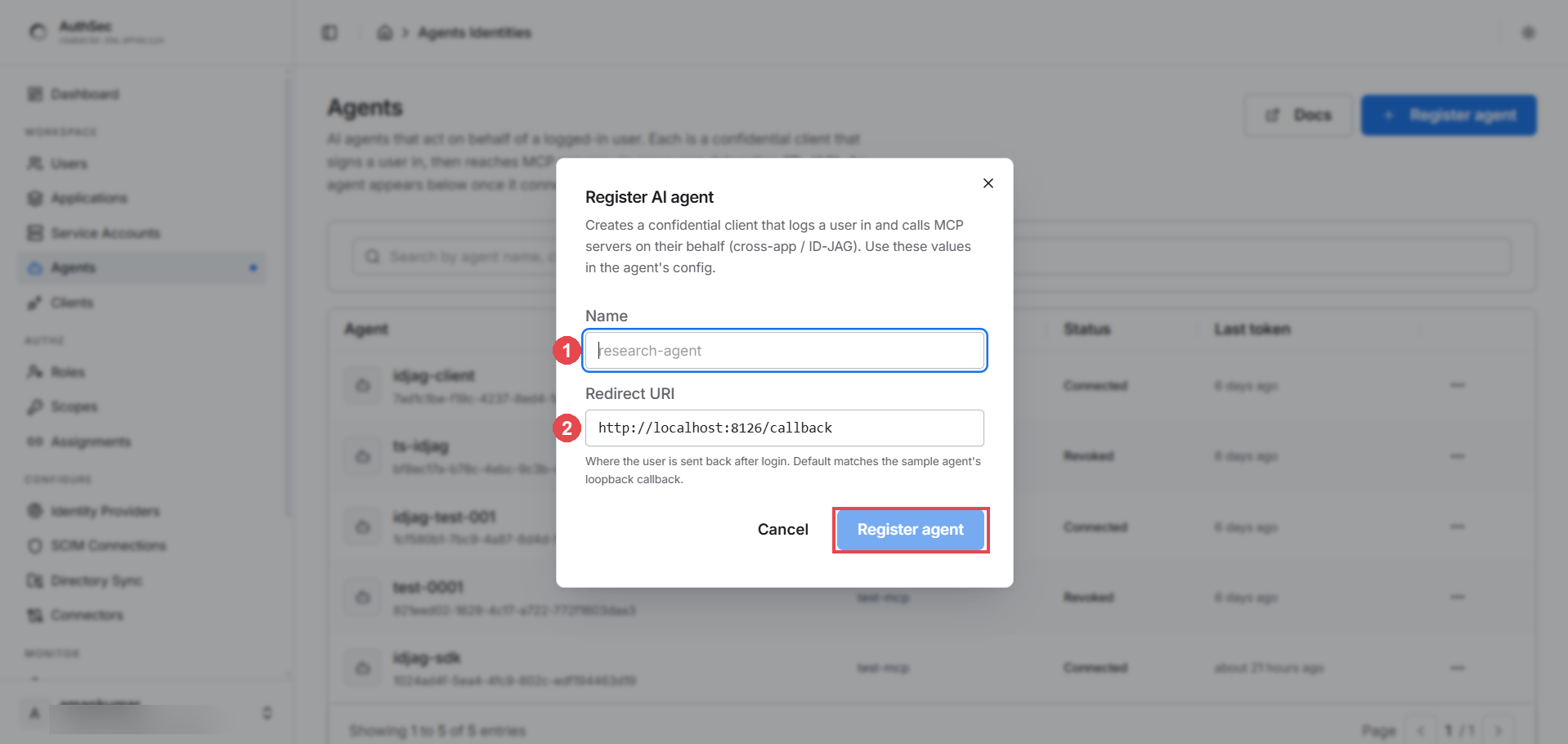
- Name — a human label, e.g.
research-agent. - Redirect URI — where the user's browser lands after login. For the SDK's
BrowserLogin, keep the loopback defaulthttp://localhost:8126/callback; for a web app, use your own OAuth callback URL.
Step 2 — Copy the credentials (shown once)
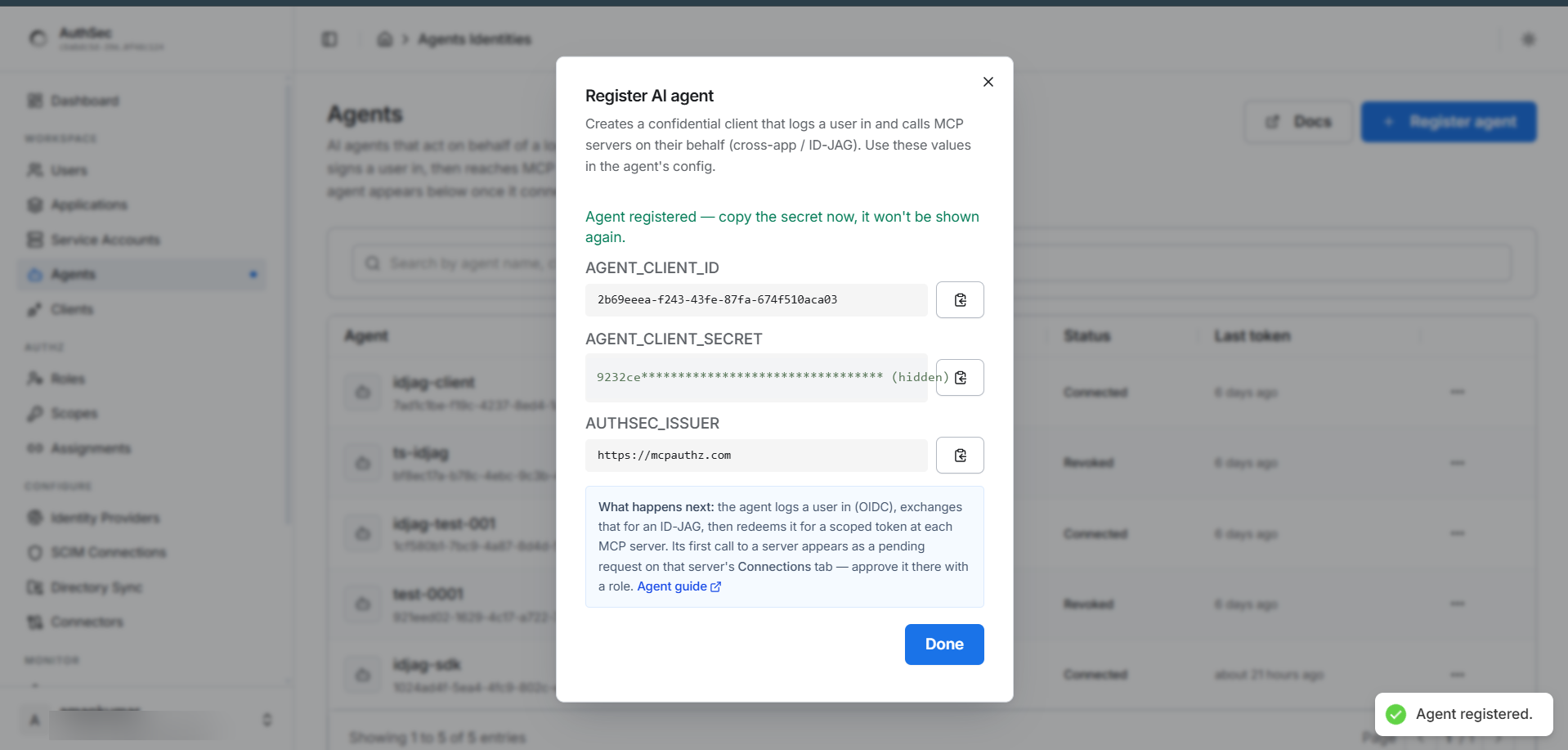
AUTHSEC_ISSUER=https://mcpauthz.com
AUTHSEC_AGENT_CLIENT_ID=64c45f84-...
AUTHSEC_AGENT_CLIENT_SECRET=<the secret you copied>
AUTHSEC_RESOURCE_URI=https://your-mcp-server.example.com/mcp
Step 3 — Wire the SDK
This is a complete program: log the user in, acquire a delegated token, and handle the first-run approval.
package main

import (
	"context"
	"errors"
	"log"
	"os"

	authsec "github.com/authsec-ai/sdk-authsec/packages/go-sdk"
)

func main() {
	ctx := context.Background()
	issuer := os.Getenv("AUTHSEC_ISSUER")
	resource := os.Getenv("AUTHSEC_RESOURCE_URI")

	// 1. Log the user in (opens the browser, PKCE). Web apps: skip this and pass
	//    the id_token from your own OIDC login into WithUserSession instead.
	idToken, err := authsec.BrowserLogin(ctx, issuer, os.Getenv("AUTHSEC_AGENT_CLIENT_ID"),
		&authsec.BrowserLoginOptions{Resource: resource})
	if err != nil {
		log.Fatalf("browser login: %v", err)
	}

	// 2. The agent's own identity. Build one instance per process — it caches tokens.
	agent := authsec.NewAgentIdentity(authsec.AgentIdentityConfig{
		Issuer:    issuer,
		ClientID:  os.Getenv("AUTHSEC_AGENT_CLIENT_ID"),
		Auth:      authsec.NewClientSecretAuth(os.Getenv("AUTHSEC_AGENT_CLIENT_SECRET")),
		IDPIssuer: issuer, // required to enable the XAA/ID-JAG path
	})

	// 3. A scoped token, delegated from the user.
	opts := []authsec.AccessForOption{
		authsec.WithUserSession(idToken),
		authsec.WithRequestedScopes("test_mcp:read", "test_mcp:tools:read"),
	}
	token, err := agent.AccessFor(ctx, resource, opts...)

	// 4. First contact needs admin approval — poll until approved.
	var pending *authsec.PendingApprovalError
	if errors.As(err, &pending) {
		log.Printf("waiting for admin approval (request %s)…", pending.RequestID)
		token, err = authsec.PollUntilApproved(ctx, agent, resource, pending.StatusURL, nil, opts...)
	}
	if err != nil {
		var denied *authsec.ApprovalDeniedError
		if errors.As(err, &denied) {
			log.Fatal("admin declined access")
		}
		log.Fatalf("access_for: %v", err)
	}

	log.Printf("token acquired (%d chars) — use as Authorization: Bearer", len(token))
	// token: sub = the user, act.client_id = this agent (auditable delegation)
}
What each call does, and what the SDK handles for you:
BrowserLogin(ctx, issuer, clientID, opts)runs a complete OAuth PKCE login and returns theid_token— your proof that the user authenticated and consented. Internally it does OIDC discovery (/.well-known/openid-configuration), generates the PKCE verifier/challenge, spins up a one-shot local callback server onopts.Port(default8126), opens the browser, waits for the redirect, and exchanges the authorization code for tokens.BrowserLoginOptions:Resource(bind the login to one MCP server, RFC 8707),Scopes(default["openid","email","profile"]),Port(must match the registered redirect URI),Timeout(default 300 s), andOpenBrowser(override to surface the URL yourself on headless/remote hosts).AgentIdentityConfig.IDPIssueris what enables delegation. Without it — or without a user session, or on an AS that doesn't advertise the XAA grant types —AccessForsilently uses the M2M direct path instead. Set it to your enterprise IdP issuer (here the same AuthSec issuer).WithUserSession(idToken)supplies the subject token for the token-exchange step;WithRequestedScopes(...)limits what the delegated token can carry.AccessForperforms the whole two-hop exchange (token-exchange → jwt-bearer) and caches the result. On first contact it returns a*PendingApprovalErrorcarrying theRequestIDandStatusURL— not a failure, but a signal that the admin hasn't approved yet.PollUntilApproved(ctx, agent, resource, statusURL, *PollOptions, opts...)polls the status URL (defaults: 3 s interval, 300 s timeout — pass a*PollOptionsto change them). On approval it clears the cache and callsAccessForagain with the same options you pass here (so passWithUserSession/WithRequestedScopesagain). It returns*ApprovalDeniedErrorif the admin declines and*ConnectionRevokedErrorif access is revoked. Transient poll errors are non-fatal — it keeps polling until the deadline.
Scopes must exist on the target server. Requesting a scope the server doesn't define looks exactly like "waiting for approval forever" — this is the most common mistake. Check the server's PRM document (
/.well-known/oauth-protected-resource/mcp,scopes_supported) and request only scopes listed there.
Step 4 — First run: the user logs in and consents
Run the agent. The browser opens to the AuthSec login; the user signs in and sees a consent screen listing exactly the scopes the agent requested. They click Allow — once. That's the user half of the double opt-in.
Headless or remote? Override
BrowserLoginOptions.OpenBrowserwith a function that surfaces the URL (log it, message the user), complete the login where a browser is available, or — in a web app — skipBrowserLoginentirely and pass theid_tokenfrom your own OIDC login intoWithUserSession.BrowserLoginOptions.Port(default8126) must match the registered redirect URI.
Step 5 — First run: the admin approves the connection
Meanwhile AccessFor returned *PendingApprovalError and your code is polling —
because the admin half hasn't happened. Open the application's Connections
tab:
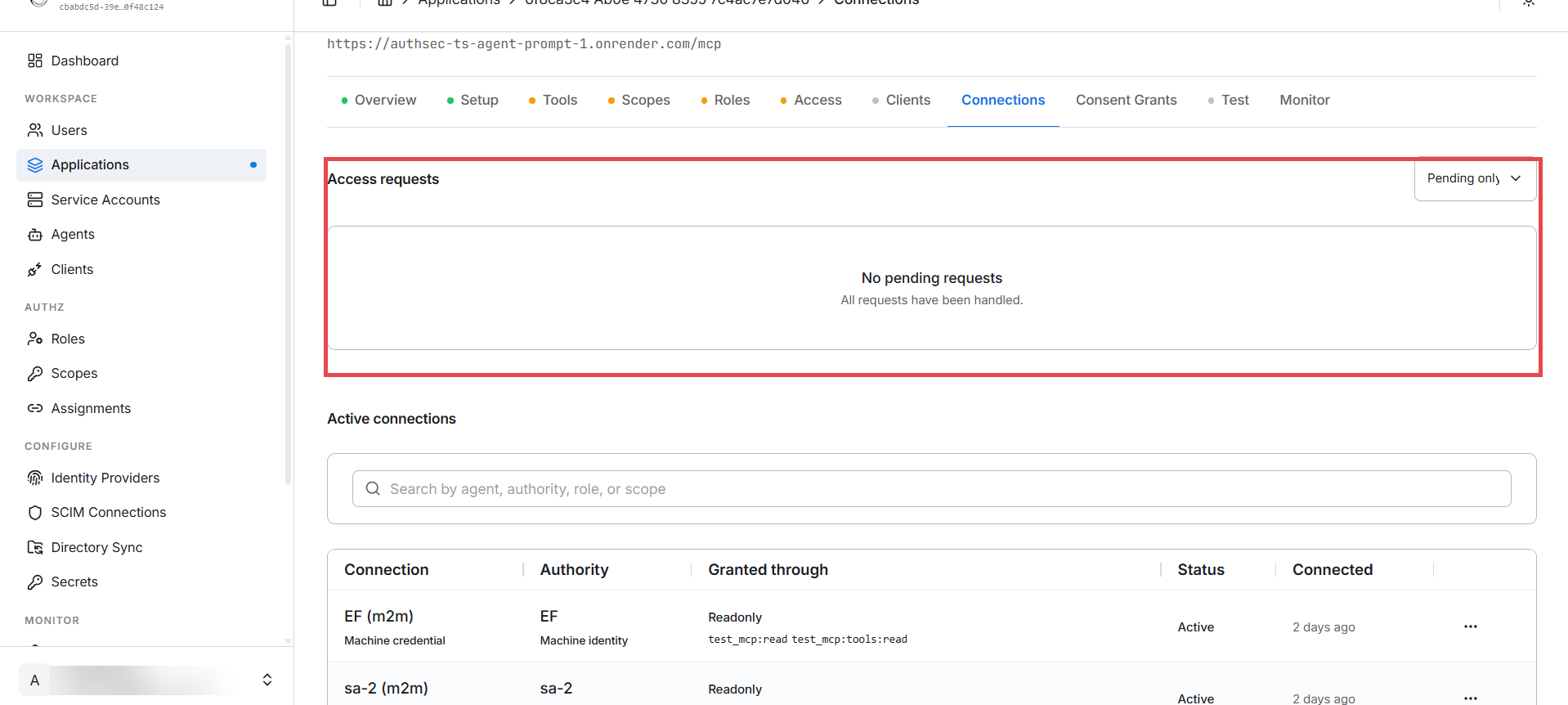
- Access requests — the agent's first call appears here as pending. Approve
it and pick the role it gets (e.g.
Readonly). Your polling agent picks up the approval automatically and completes with a token — no restart. - Active connections — every approved agent/service connection, showing the authority it acts under, the role and scopes it was granted through, and when it last connected.
Step 6 — Every run after: seamless
Both approvals are one-time. From now on the same user + agent + server combination goes straight through: login → cached/renewed token → tools. No consent re-prompt, no pending request, no admin involvement. The token is cached per resource and renewed transparently before expiry.
Revoking an agent
Either side can kill the delegation at any time:
-
Per agent — Agents page → ⋯ → Revoke connection. Status flips to
Revoked; the next call fails with*ConnectionRevokedError.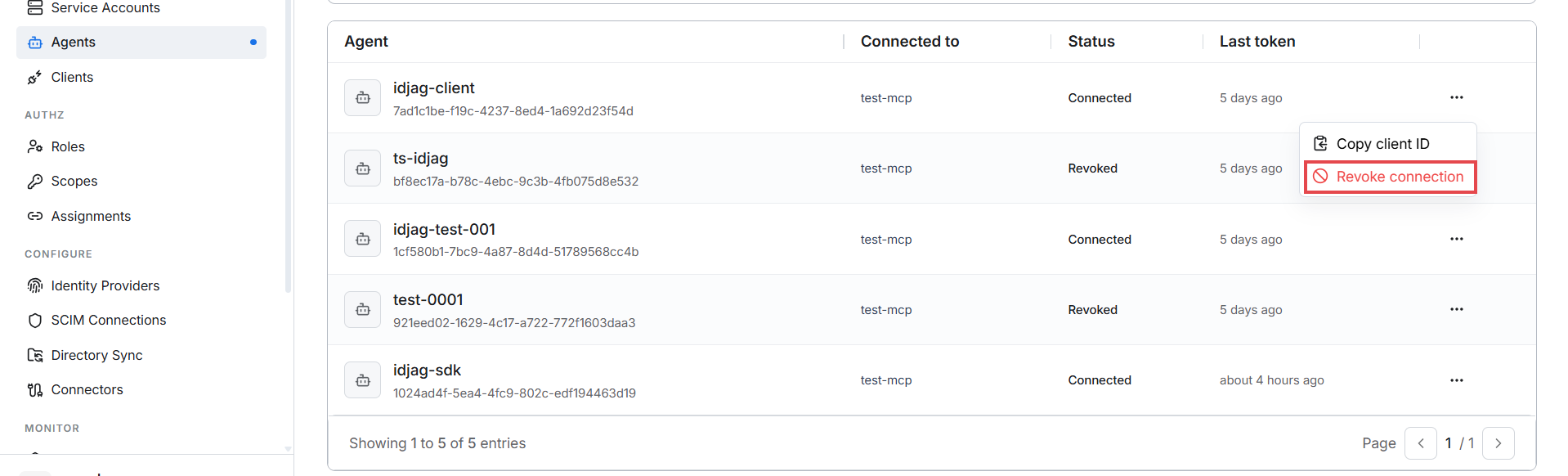
-
Per identity on an app — the app's Access tab → Who has access → ⋯ → Revoke access. Works for any identity (agents, users, machines) and only affects this application.
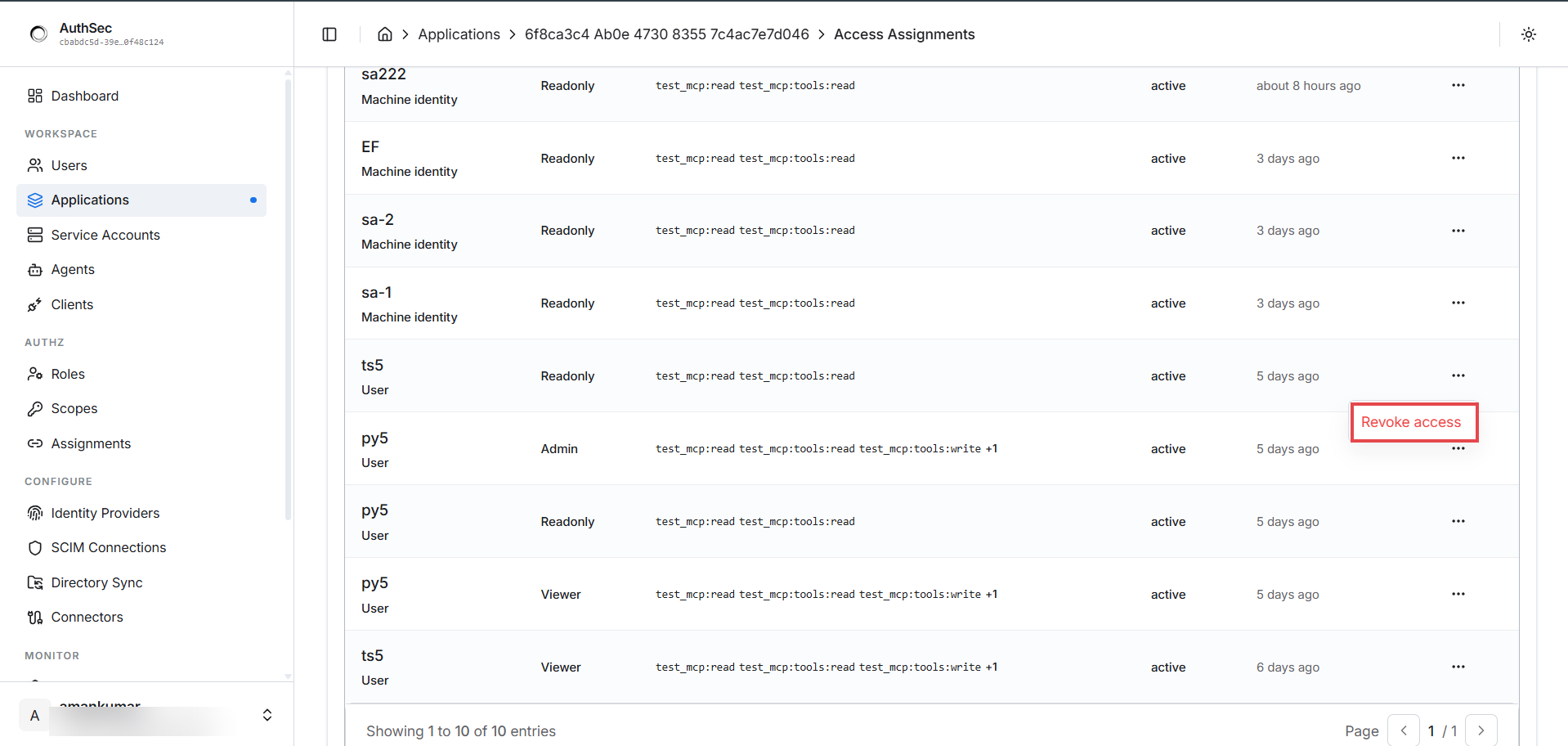
Revoking the agent removes its right to act for the user — the user's own access is untouched.
Error handling reference
Agent-side errors are pointer types embedding AuthSecIdentityError (each with a
stable Code and HTTPStatus); match with errors.As:
| Type | Code | Meaning | What to do |
|---|---|---|---|
*PendingApprovalError | access_pending | First contact — admin approval pending (has RequestID, StatusURL) | PollUntilApproved(...) |
*ApprovalDeniedError | approval_denied | Admin declined the request | Inform the user; don't retry |
*ConnectionRevokedError | connection_revoked | A previously approved connection was revoked | Re-request access, or inform |
*TrustedIssuerMissingError | trusted_issuer_missing | The IdP isn't trusted by the AuthSec AS | Dashboard: configure the identity provider |
*SubjectMappingFailedError | subject_mapping_failed | Couldn't map the external identity to a local user | Check user provisioning / IdP claims |
*CredentialInvalidError | credential_invalid | Agent's client_id/secret wrong | Re-copy from registration (or re-register) |
Troubleshooting
| Symptom | Cause | Fix |
|---|---|---|
| Stuck "waiting for approval" forever, nothing in Connections | Requested scopes don't exist on the target server | Use scopes from the server's PRM scopes_supported |
AccessFor never triggers delegation (acts as M2M) | IDPIssuer unset, no WithUserSession, or the AS doesn't advertise XAA grants | Set IDPIssuer, pass WithUserSession(idToken); confirm the AS supports token-exchange + jwt-bearer + id-jag |
Browser doesn't open on BrowserLogin | Headless/remote session | Override BrowserLoginOptions.OpenBrowser, or pass an externally-obtained id_token |
redirect_uri mismatch at login | Agent registered with a different redirect URI/port | Match the registration; Port default 8126 → http://localhost:8126/callback |
Works, then suddenly 401s | Connection revoked, or token expired mid-session | agent.ClearCache(resource) and retry; if *ConnectionRevokedError, re-request |
| Agent missing from the Agents page | Never successfully connected | Normal — it appears after its first server connection |
Related
- Machine-to-machine auth — act as yourself instead of for a user
- Protect your MCP server — the server these tokens call, and how it reads
sub/act - Go SDK overview — install, config reference, package layout